1. Introduction
The differences between science, technology, engineering, and mathematics (STEM) expertise and current work demands due to technological advances call for pedagogical innovation through technology (National Academies of Sciences, Engineering, and Medicine, 2025). Research studies have found online learning communities increase comfort, communication, and collaboration among students and instructors (Bliss & Lawrence, 2009; Dawson, 2006; Kumi-Yeboah, 2018). In effect, students need to feel supported and a sense of belonging to leverage community development, identity formation, and critical thinking—all of which result in better academic performance (Gunawardena & Layne, 2018). Usually, the conceptualization of engineering does not include the diverse students in today’s universities, with its pictures of men who build, fix, and work with machines or infrastructures (Lezotte, 2023). Ultimately, to increase equity, accessibility, and a student-centered design, the adoption of technology can further leverage this effort (Kumi-Yeboah, 2018). In a rapidly developing field, professionals are noticing a lack of soft skills among those entering the engineering field. This includes communication, leadership, adaptability, and interpersonal effectiveness among engineering graduates. Recent studies also highlight the role of student organizations as a vital space for cultivating these skills through teamwork, networking, and competitive settings (Key et al., 2024; Kitchen et al., 2022; Nurhakim et al., 2023; Wati, 2023).
Creating an online wisdom community allows for more adaptability to better suit students and their individual needs and interests to increase success and learning (Cifuentes & Perry, 2022). According to (Gunawardena & Layne, 2018), Wisdom Communities (WisComs) support the inclusion of learners from diverse sociocultural perspectives and emphasize that learning happens through socially-shared activities that can either be synchronous or asynchronous. By sharing knowledge, students broaden their perspectives and deepen their knowledge. To facilitate this learning, we employ Mixed Reality (MR) to create online spaces for learner communities. Milgram et al. (1995) popularized the term MR, describing it as a space between fully real and fully virtual on a real-to-virtual environment continuum. This description of MR is, however, quite broad. Speicher, Hall, and Nebeling (2019) further define a subset of MR—Alignment—as a type of MR demonstrating synchronization between a physical and virtual environment. MR in academic settings can be defined as learning environments that create student spaces for developing better social connections and learning their course material (De Maurya et al., 2025).
In this exploratory study (Stebbins, 2025), our goal was to explore how to design and deploy an online MR learning environment that supports the development of an inclusive community (Gunawardena & Layne, 2018). Previous research has found that currently available tools for online learning need more emphasis on synchronous communication, online engagement, and community development; MR may be the best current technology available for addressing those needs (Konstantinou & Epps, 2017). In our design, we focus on the social presence, i.e., the “illusion” of two or more people being physically co-present when they are interacting over computer-mediated communication channels (Kreijns et al., 2022), afforded by MR. Furthermore, we aim to support students’ sense of community, i.e., the social-psychological experience of membership, opportunity for influence, fulfillment of needs, and emotional connection to a group (Chavis et al., 2008). We consider students’ perceptions of social presence and sense of community to assess our exploratory design and deployment of the MR learning platform.
Based on these design goals, we deployed an alignment-style MR platform taking the form of a web-based application. This application presented students with a virtual environment designed to visually mirror the physical spaces in which they met for coursework and extracurricular activity. We then deployed this MR platform across two academic settings to explore how this technology supports student sense of community and co-learning.
The first context was an upper level Electrical and Computer Engineering (ECE) course and the second setting was in a student run electrical engineering club. The purpose of the study was to compare the learning experiences of engineering students in a class and in a student club after using the MR platform. We wanted to explore how the use of the MR platform influenced students’ perceptions of social presence and sense of community with their respective groups. The research question guiding this study addressed, what were the main differences between the use and utility of the MR platform between students in a class and students in a club? This study is situated at a Hispanic and Land Grant four-year institution.
2. Literature Review
MR technologies have been used as a new learning tool and a strategy to increase student engagement and inclusion, as well as for comprehension of course content (Crogman et al., 2025). In particular, the University of Maryland has integrated MR tools in engineering courses, so students can interact with 3D models of machinery, circuitry, and other engineering components. As a result, students showed a better understanding of complex processes and mechanisms (Crogman et al., 2025). MR has also been used to play science games highlighting students’ use of critical thinking and teamwork as well as enjoyment while learning. Furthermore, MR applications to support STEM distance laboratory lectures, in particular, has helped students understand assembly drawings of complex machines, with a high rate of acceptance and transferability to other disciplines (Gattullo et al., 2022). In addition, student involvement in organization activities contribute to students’ mental, physical, social, behavioral, and moral development. Four trends were found to improve student skills, including membership negotiation, self-structuring, activity coordination, and institutional positioning (Garcia et al., 2025). In particular, holding leadership positions fostered the opportunity to strengthen decision-making, management, and organizational skills. Also, peer interactions helped develop effective communication, improved active listening, and navigated diverse perspectives. In turn, team collaboration encouraged conflict resolution and mutual respect. Participation in student organizations helps create an environment for students to grow their communication skills (Wati, 2023). Furthermore, STEM student organizations not only help get students involved with expanding their interests and knowledge, but are also useful resources. As discussed in (Kitchen et al., 2022), who studied the impact of college-run STEM organizations, found that student club involvement increases students engagement with science and engineering, and also the likelihood of staying in STEM fields and pursuing STEM careers. A study done by (Key et al., 2024) at the University of Washington Bothell also found that working with college students participating in STEM programs helped them feel included. Both of these studies concluded that involvement, a strong sense of community, and engagement within these STEM programs help retention of students in STEM programs.
The use of technology in academic settings increased since the COVID-19 era and the adoption of online learning. The expansion of online learning brought other challenges, such as considering the diversity of learners and the importance of online social presence to make learning more effective and learners can connect better with others (Gunawardena & Layne, 2018). Oftentimes, students struggle with online self-paced and asynchronous learning due to loss of attention, mental fatigue, social disconnection, and time management issues (Hall, 2022). Likewise, (Rothstein et al., 2023) found that asynchronous online discussion forums for students help ensure they can find help outside of the classroom and more importantly when blended with in person learning it helps students feel seen and supported. It is important that when students are in virtual learning environments that they feel included, in particular if they are marginalized and underserved students (Ab Latif, 2024; Rothstein et al., 2023). Both social presence and sense of community are essential for developing students’ feeling more integrated, included, and connected with their peers and instructors without the need to be physical present (Kreijns et al., 2004; Wati, 2023).
3. MR Platform Design
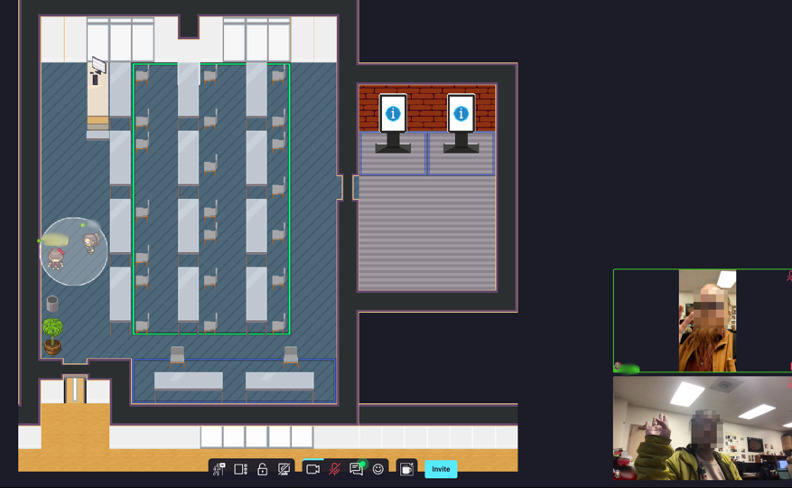
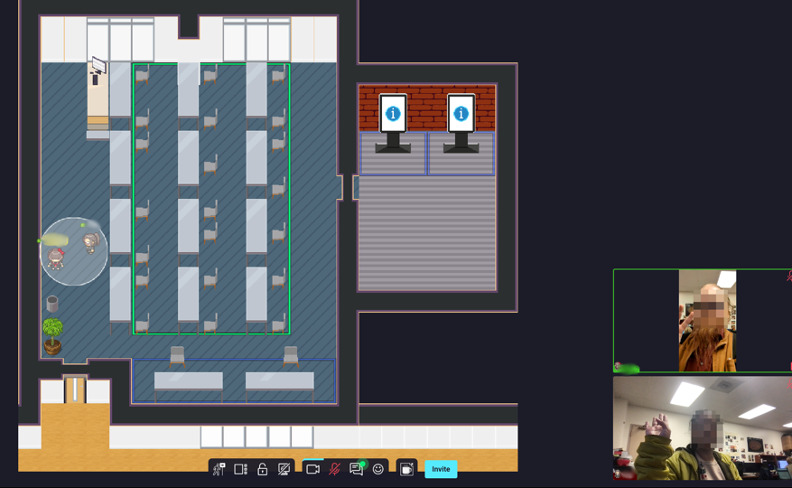
The research team, composed of faculty and graduate students from computer science, engineering, sociology, education, and psychology, worked together to implement and assess an Alignment MR (Speicher et al., 2019) interactive platform. The design of the system was based on the results of prior participatory design research with ECE students (De Maurya et al., 2025). The platform was built on the open-source software WorkAdventure (Rocher et al., 2020). This environment contains a virtual environment designed to mirror the physical venues of our study deployments. Figure 1 shows the MR platform’s configuration during the first deployment, which we detail later in this paper. The key features of this environment are avatars, proximity meetings, and activity zones. We describe these features and their design motivations in the following subsections.
3.1. Avatars and Proximity Meetings
Participants who connect are asked to create a custom virtual avatar, which they can move around the virtual space, and select a role. Their role changes the color of their username for everybody in the virtual space. When two to five participants’ avatars approach each other, a proximity meeting is formed allowing them to communicate via text messaging, audio/video calls, and screen sharing (see Figure 1). This is a default feature provided by WorkAdventure, and is intended to help students easily communicate with one another and dynamically configure their social arrangements and interactions in the space.
3.2. Activity Zones
Activity zones are predetermined areas within the virtual space in which special activities occur when a participant moves their avatar into the zone. Although WorkAdventure does not enforce making zones visible, all activity zones that we designed are signified by a colored border on the floor denoting what kind of zone they are. We detail the types of activity zones below.
Meeting Rooms (Green Border): Meeting zones were set up to allow all participants in the zone to connect to a video meeting hosted on a local Jitsi Meet server (Ivov, 2013). This meeting appears as an embedded interface within the virtual space. These meetings are similar to a Zoom video call with participants being able to share and see webcam and screensharing video streams from others in the room. These zones were added to provide more static meeting spaces that could be used to establish longer term and higher user-capacity interactions than those supported by proximity meetings.
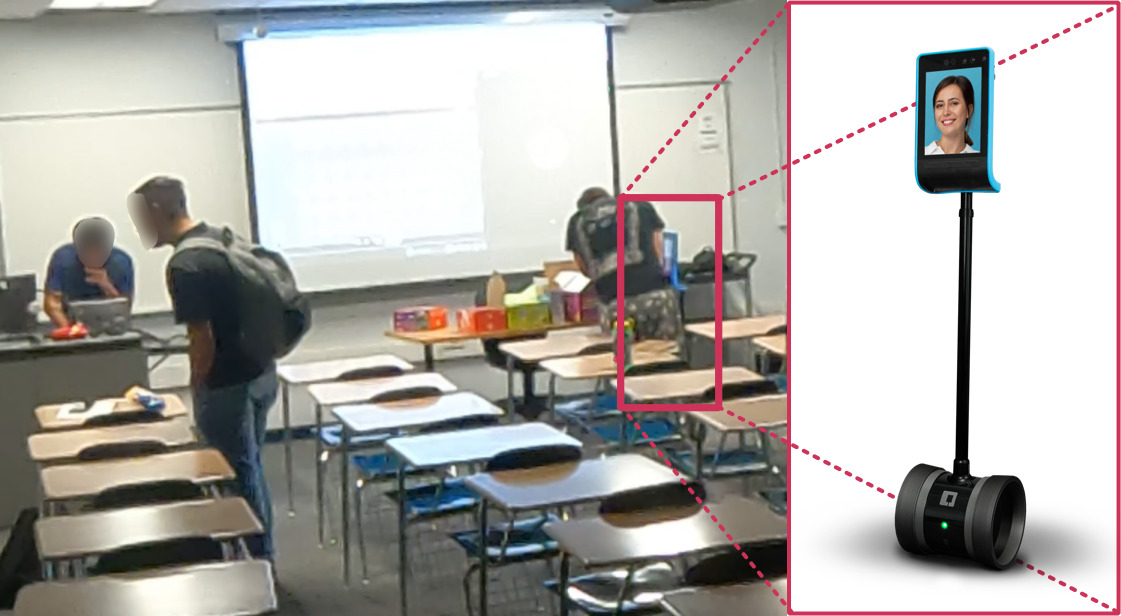
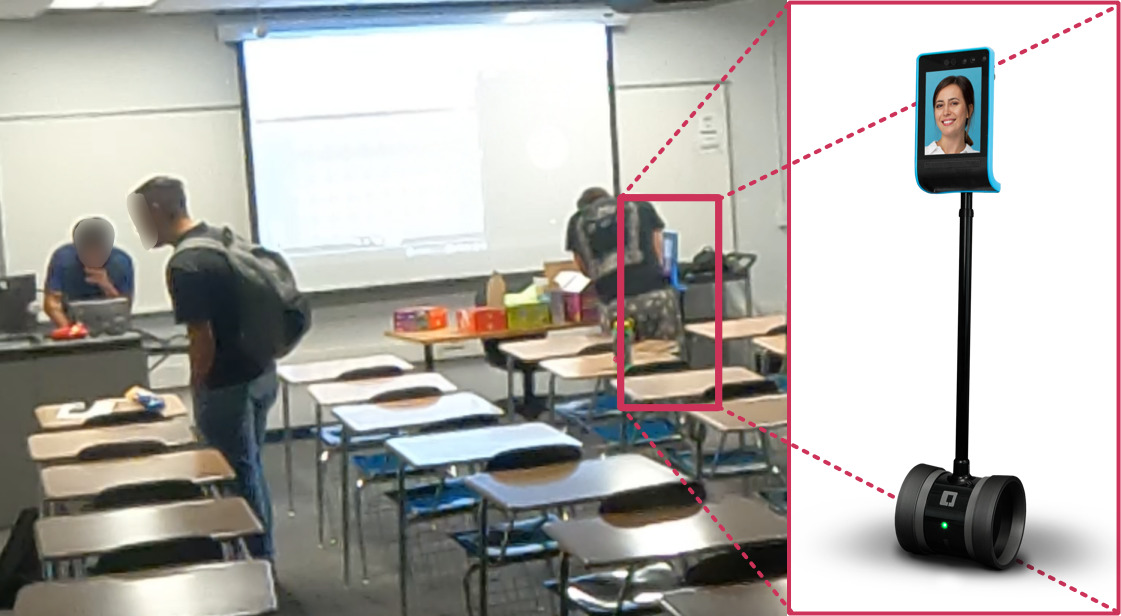
Telepresence Robots (Blue Border): Telepresence zones were set up to enable participants to pilot a Double3 telepresence robot (Double Robotoics, Inc., 2011), which researchers provided in the non-asynchronous deployments described in this paper. Upon entering the zone, participants are prompted to open a new tab containing the Double3 piloting UI. Participants piloting these robots could drive around within the physical space to engage with their peers and instructor using an attached tablet for video calling. Students could also share their screens directly onto these robots as a method of sharing their workspaces (see Figure 4).
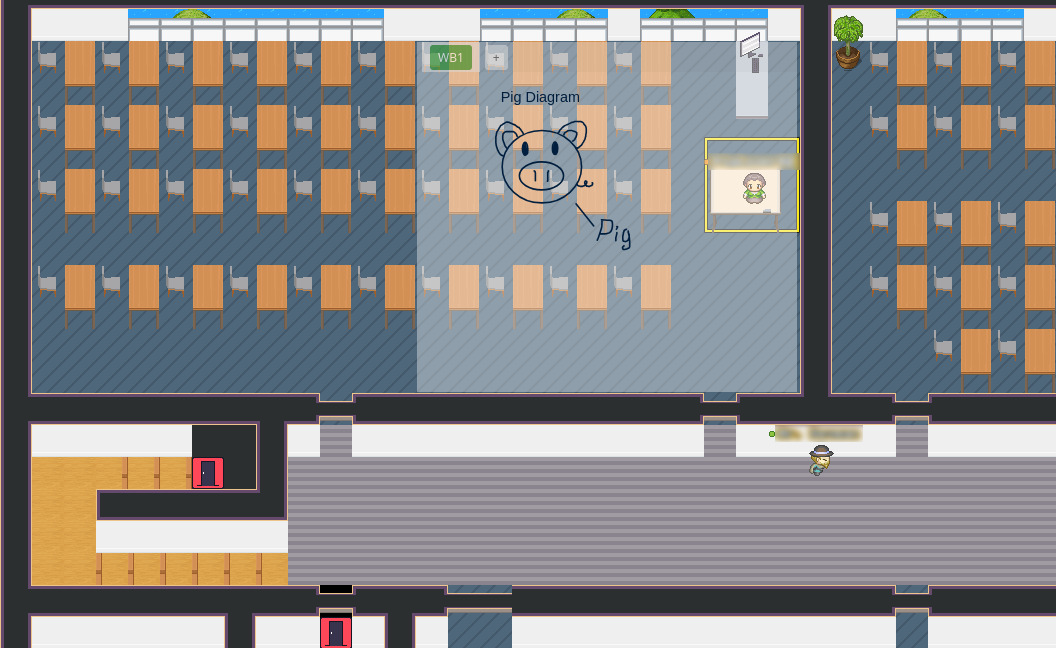
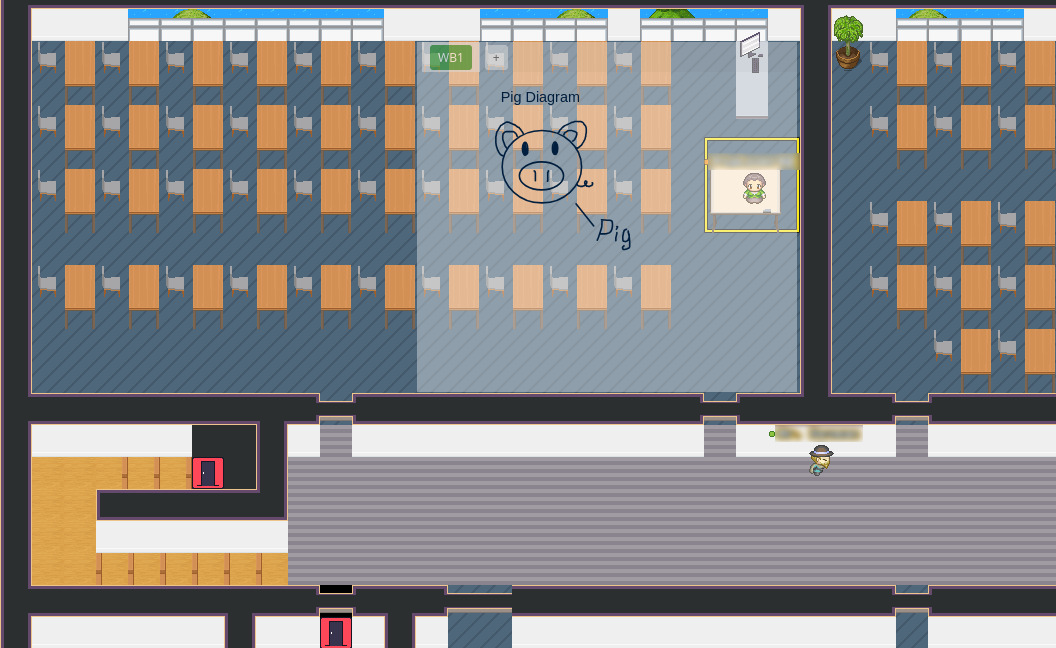
Collaborative Whiteboards (Yellow Border): Whiteboard zones allow participants to create, access, and edit shared whiteboards via a locally hosted instance of the open source application WhiteBoardOnline (Whiteboard Online, 2011). Upon entering the zone, participants are provided an iframe UI allowing them to select active whiteboards or create a new whiteboard. Once a whiteboard is selected, it opens in a new tab. Active participant whiteboards are visualized over the mixed reality space so that participants can maintain awareness of others’ work (see Figure 2). Engineering education often involves significant visual collaborative work, e.g. solving mathematical engineering problems or designing systems. To support this collaborative work, we designed and developed an integrated collaborative whiteboard feature in the MR space between the first and second deployments described in this paper.
4. Methodology
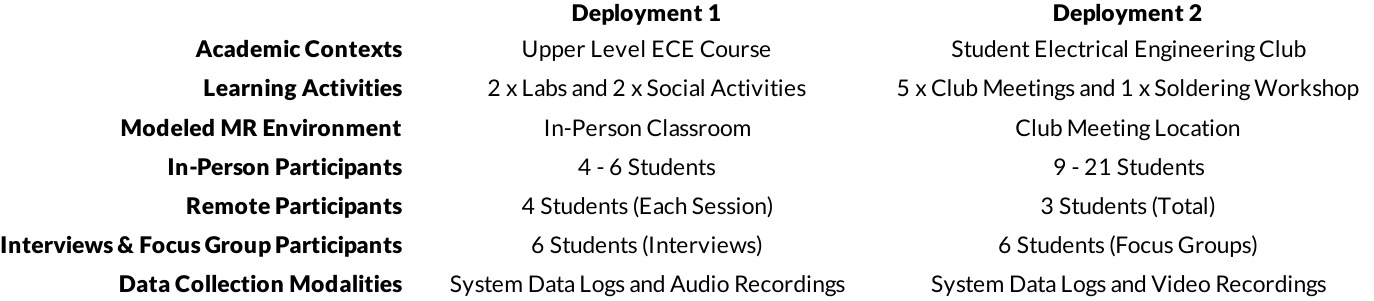
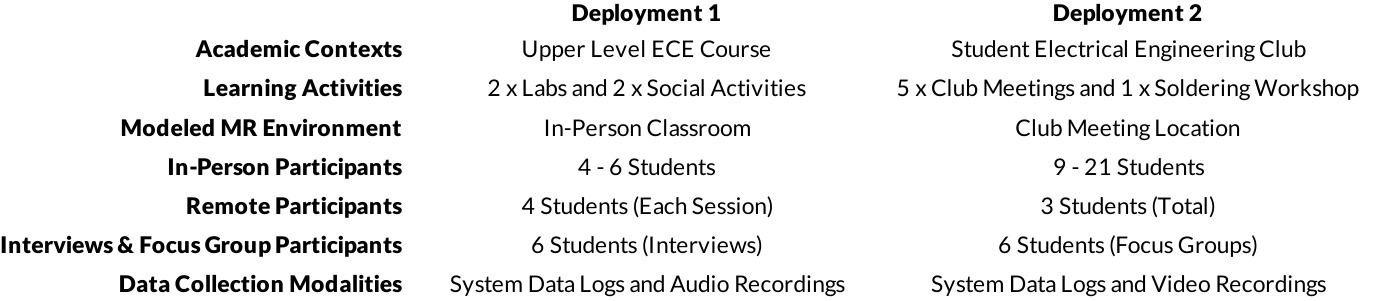
To investigate how students adopt and use MR within social learning contexts, we deployed the MR platform across two different educational settings. The first of which was an upper-level electrical and computer engineering (ECE) course, in which the research team designed and guided activities for students to engage with using the MR platform. The second deployment was performed in collaboration with a student-run electrical engineering club (EEC), in which the research team provided and maintained the MR platform as a tool for students to use. There was no overlap in students attending the two deployments; No student attended both deployment 1 and 2. These two deployments allow us to evaluate how students engage MR with regard to both structured events and unstructured events. Within the context of this paper, we consider structured events as events which are designed to incorporate MR as a core feature of the event. In contrast, we consider unstructured events as events which are not designed to use MR as a core feature, but which may be supported by the MR features. We describe these deployments, data collection, and analyses employed in the following sections. Table 1 summarizes these deployments.
4.1. Deployment 1: In-class Setting
The first deployment was performed across four in-class sessions with a group of ten upper-level ECE students to assess the efficacy of MR as a support tool during the 2024 Fall semester. We focused on two axes for our evaluation in this deployment. On the first axis, lab tasks versus social events, we assessed the utilization of MR as a tool to support students in formal academic and informal community contexts. On the second axis, physical participation versus remote participation, we examined how MR could bridge the gap in experience between in-person and remote students. With this deployment we also examined student MR usage inside the context of structured events, i.e., the instructor[1] plans and conducts sessions with their students in which usage of the MR platform is required to complete learning activities.
Participants attended four sessions during the Fall 2024 semester. Student participants consented to participating in each session. The MR platform was used in each session. The number of participants who attended these sessions varied from = 8–10 (due to student attendance). During each session, researchers asked a subset of students in attendance, = 4 student volunteers per session, to attend from a different classroom using the MR platform to simulate a remote experience, with the remaining students attending in-person. In-person students and the instructor were asked to connect with the platform in order to communicate with their “remote” peers. In-person students were allowed to interact face-to-face as they would regularly be able to do within a classroom. We describe these sessions below.
Laboratory Session 1: The first study session took place on October 24, 2024. The goal of this session was to introduce the participants to the MR platform and to observe how it would impact their performance in a laboratory activity. We asked the instructor of the class to connect to the MR environment and guide the students through their lab activity as they normally would. The lab activity required them to work in teams. Teams consisted of both in person and “remote” students. The lab activity demonstrated measuring and filtering noise from a helicopter simulation using software created by (Quanser Inc., 2019).
Social Event 1: The second study session took place on October 31, 2024. The goal of this session was to observe how participants utilized the MR platform while engaging in non-academic social activities. We asked the students to use the interactive whiteboard the Jitsi zone to play “A Fake Artist Goes to NY”, a drawing-based social deduction game.
Laboratory Session 2: The third study session took place on November 14th, 2024. The goal of this session was to observe how students complete another in-class laboratory activity supported by the MR platform, now that they have had two prior sessions. During this session the course instructor was absent, so a member of the research team prepared and facilitated the lab. Once the lab was introduced, students split into in person and “remote” groups to complete the lab work.
Social Event 2: The fourth study session took place on November 21, 2024. The goal of this session was to again observe participants’ social and community interaction, now that they had significant familiarity with the system. Thus, students played a game of ECE-themed Jeopardy. Students were split into two teams, each team consisting of in person and “remote” members. The game was shared via the platform’s screen-sharing functionality.
4.2. Deployment 2: Student Club Setting
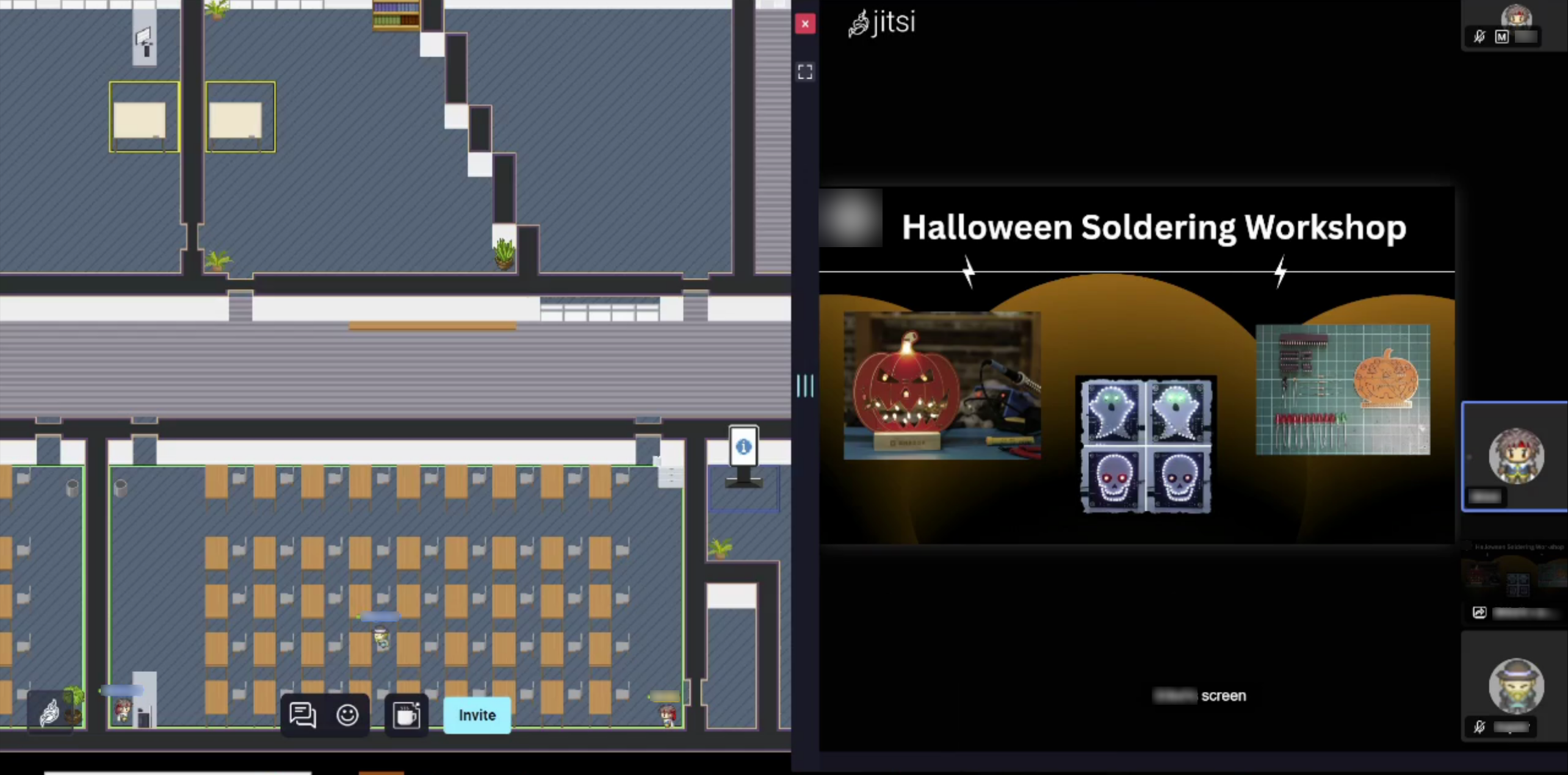
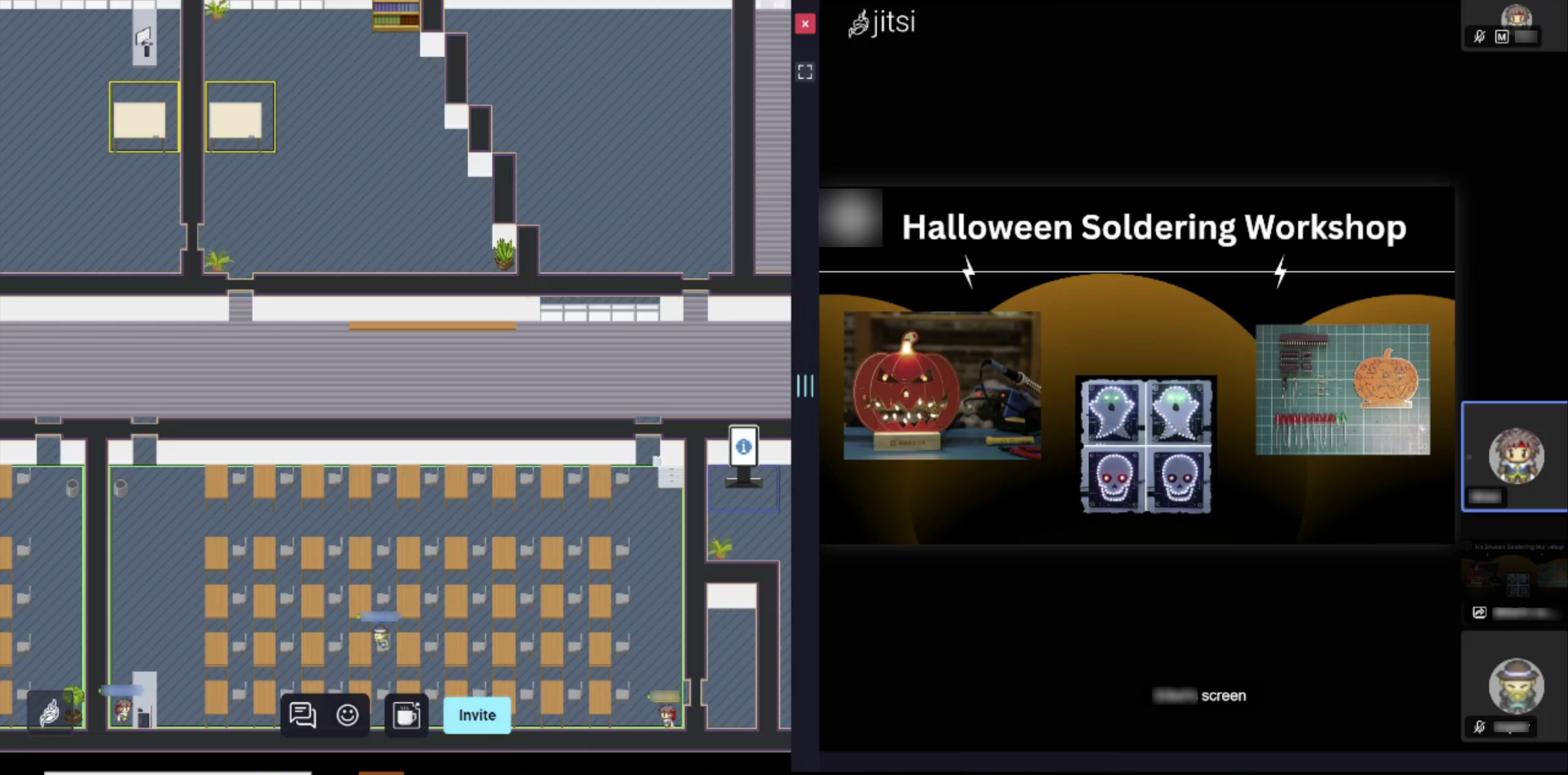
The second deployment was performed across five EEC student chapter meetings, one workshop event, and asynchronously during the 2025 Fall semester. Prior to this deployment, we met with EEC leadership to determine how to meaningfully and non-intrusively integrate the MR platform with club activities. As a part of these meetings, the MR platform went through a redesign to visually align with the venues the club would use for their bi-weekly meetings and for their planned workshop event (See Figure 3). During this deployment, at least one researcher attended each club meeting and workshop to observe how students chose to engage with the MR platform. With this deployment we examine student MR usage inside the context of unstructured events. The EEC leadership and members were provided with the MR platform as a tool, but had the freedom to use (or not use) this tool to supplement their already established club activities. We describe the three settings of this deployment below.
EEC Meetings: Five student-run club meetings took place across the 2025 Fall semester on September 24th, October 8th, October 22nd, November 5th, and November 19th. The number of participants in these meetings were = 9–21 (due to student attendance), with an average of = 15.2 participants across the meetings. The participants were all undergraduate students ranging from freshman to seniors. During the start of the first EEC meeting, researchers introduced the MR platform to participants and attained club members’ consent to participate in research. Researchers requested and obtained consent at the beginning of each subsequent meeting. EEC leadership was asked to help facilitate promotion of the MR platform as a tool enabling participants to remotely work together. Participants were then asked to conduct their club meetings as they normally would. During each EEC meeting, at least one researcher quietly observed from the back of the room and set up audio-visual recording equipment.
Workshop Event: One EEC workshop event took place during the 2025 Fall semester on October 31st over the course of 4 hours. The number of participants at this event was = 15. During this event, EEC leadership provided student attendees with materials and tutoring to complete a small soldering project. During this event, researchers modified the MR platform to introduce a live-stream linked to a document camera at the EEC president’s soldering workstation. This live-stream was accessible both in the MR platform and via a screen placed within the workshop venue. Four researchers were present at the venue to observe and take note of how participants chose to use the provided platform both online and in-person.
Asynchronous Usage: Researchers kept the MR platform online and available to participants throughout the 2025 Fall semester. Participants were told that they were welcome to use the platform anytime as a resource for communicating with their peers. Prior to allowing participants online to the MR platform, they were asked to review a consent form and virtually consent once per week in order to use the MR platform.
4.3. Data Collection
The research team collected data using different sources and techniques. First, we took both audio and visual recordings throughout all sessions in Deployment 1 and all EEC meetings in Deployment 2, as well as had at least one member of the researcher team present to observe and take notes during all synchronous deployment activities. Second, the MR platform is outfitted to track and collect Interaction Data, which comes in the form of join/leave events, enter/exit events, user content, and user roles. Third, we conducted interviews and a focus group with six student participants respectively to gain insight into their experiences and documented observations from student sessions using the MR platform.
4.3.1. Session Recording
Deployment 1: Between two to five researchers were present each session to facilitate the sessions and take notes. Additionally, one audio record device was placed in the classroom where the “non-remote” students attended class. Deployment 2: During the EEC Meetings segment, between one to three researchers were present each meeting to observe and take notes. In addition, we set up two video recording devices and one audio recording device in the meeting room and took a screen recording of the MR platform to assess how the EEC engaged with the platform during meetings. During the Workshop Event segment, four researchers were present to observe and take notes on how participants chose to use the provided live-stream setup in conjunction with their event. All audio/visual recordings are stored securely on password protected servers that only the research team has access to.
4.3.2. System Logging
Each participant who enters the online space of the MR platform is assigned an anonymized unique user ID (UUID). We track users’ activities within the platform and log this activity in a secure password protected server that only the research team has access to. Using this data we can construct a conceptual understanding of how any given user has used the MR platform. We detail the types of logs collected below.
join/leave events: Anytime a user joins or leaves Proximity Meeting, we create a log: {UUID, [UUID, …], timestamp, event}. This consists of the UUID of the user who triggered the join/leave event, a list of all other users’ UUIDs that are/were in the subject proximity meeting, a timestamp denoting when the event occurred, and an event keyword join, leave, or implicit-leave[2].
enter/exit events: Anytime a user enters or exits any Activity Zone, we log create a log: {UUID, ZoneID, timestamp, event}. This consists of the UUID of the user who triggered the enter/exit event, a unique ID denoting which activity zone is interacted with, a timestamp denoting when the event occurred, and an event keyword enter, exit, or implicit-exit.
user content: We also log anytime users create content, i.e., messages and whiteboards. When a user sends a message to one or more other users in a proximity meeting, a message log is created: {Recipient-UUID, Sender-UUID, timestamp, content}. This consists of the UUID of the user who received a message, This consists of the UUID of the user who sent the message, a timestamp denoting when the message was sent, and the content of the message. When a user enters into a Whiteboard Activity Zone and draws on the virtual whiteboard, an SVG copy of the whiteboard is saved.
user roles: The first time a new user enters the online space of the MR platform, after they affirm their consent, they will be asked to identify as one of the following: Undergraduate Student, Graduate Student, Faculty, Research Team, or Other/Prefer not to say. We create a user log that can then be used to categorize this user later: {UUID, Self-Identified-Role}. The user roles feature was added between the first and second deployments to account for the greater variability in who may be using the platform outside of the structured classroom environment.
4.3.3. Interviews and Focus Groups
By the end of fall 2024, individual interviews were conducted by two researchers responsible for the qualitative data collection, analysis, and report. Six Students from the ECE class were interviewed using a semi-structured protocol and addressing topics related to the use of the MR platform for academic and social purposes. Interviews lasted on average 35 minutes and were performed in one of the researcher’s offices at the most convenient time for students. Likewise, the focus group with students involved in the EEC student club was conducted in December 2025. Six students participated in a virtual focus group, where it was discussed the uses of the MR platform to assist with increasing students’ participation and engagement in the activities of the student club. The focus group also used a semi-structured protocol and lasted approximately 45 minutes. Both interviews and focus group were audio-recorded and transcribed. Transcriptions were uploaded into Dedoose, a qualitative data analysis software program. Individually, two researchers read and unitized the interviews and focus group information—identifying patterns that later formed themes and categories. The researchers discussed their labels and content and refined themes and categories through a second round of analysis and comparative techniques (Lincoln & Guba, 1985). Self-selected pseudonyms have been used to protect students’ identity.
5. Results
5.1. Examining MR in the Classroom Setting
Students were asked to use the MR platform to complete structured learning activities given to them across four in-class sessions. In this section, we detail our observations on in-class and “remote” student MR platform usage, and present our findings from individual student interviews.
5.1.1. In-Class Setting - Student Engagement With MR
Throughout the sessions, we found that students’ preferred method of communication was using proximity meetings rather than the meeting zones. In the proximity meetings, students demonstrated a preference for using audio-chat to complete activities, only using text-chat to organize themselves and navigate the challenges presented by using unfamiliar software, or periodically engaging in off-topic play e.g. memes, friendly teasing, and emojis. Students primarily used the meeting zones when the instructor needed to address the whole class. However, both the instructor and students found challenges in spreading awareness to all participants that the meeting zone was in use. This resulted in frequent occurrences where the instructor would go on lecturing without ensuring that they were connected with remote students.
Students engaged with the telepresence robots both playfully and as a learning tool during the sessions. One “remote” student frequently used the telepresence robot to “walk up to” their peers, and to get a better angle of the whiteboard. Both in-person and “remote” students playfully engaged with the telepresence robots near the end of several sessions, engaged by the novelty of them.
Despite being assigned groups as a part of the session activities, we observed that many participants chose to move around in the virtual space and engage with all students throughout the class rather than simply remain with their assigned group.
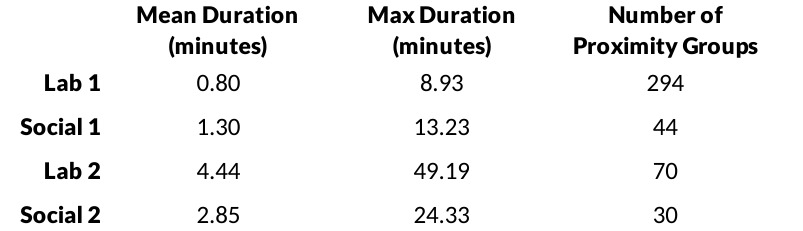
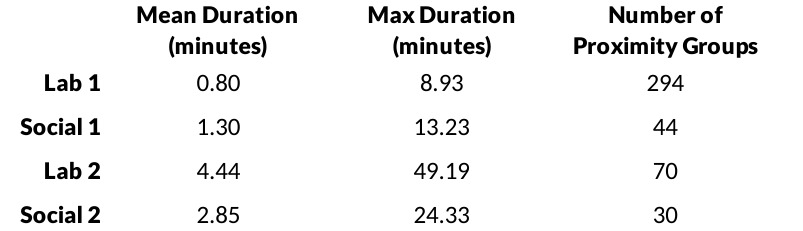
We were interested in evaluating whether or not students participated via proximity groups differently between conditions. The difference in mean length of time that students remained within proximity meetings was statistically indistinguishable between the laboratory and social activities = 0.481). However, due to the first session being the students’ first experience with the MR platform, we re-ran the -test with the first lab session excluded. Thus, we consider only the difference in time spent in proximity meetings between the second lab and the pooled data from the social event sessions. Examining the difference in proximity meeting duration between these two activity types, there is a nearly statistically significant difference in time spent at = 0.05, with the lab activity demonstrating longer meetings = 0.055). There is some evidence, then, that students were more engaged with one another during the lab activities even when it was not asked of them—though the statistical evidence for this is weak. Table 2 summarizes the mean length of time in minutes, the max duration of proximity groups, and number of proximity groups.
5.1.2. In-Class Setting - Emergent Social Experiences
Through students’ participation in individual interviews, students described their experiences related to their social interactions and sense of community due to the use of the MR platform, which for course content, was a novel experience. In particular, the first laboratory was challenging for most students. We observed students being quiet and paying attention to all instructions. Students were curious and focused on how to use the MR platform to perform well in the laboratory practice, while working in teams. Joe mentioned,
“The first lab was difficult because there were a lot of issues with the audio and also, just like the visual perspective…It was hard to work. We had fun. We found it pretty entertaining, but it was hard to actually get started doing the lab”.
During the two social activities, students were encouraged to participate in games using the MR platform, students were also teamed up for these activities and enjoyed pizza. Mostly, students had fun with these activities, even remembering pandemic times, Enrique mentioned, “With that little program, just being able to jump into someone’s little bubble, saying hi, waving Hi, having a little conversation, it was just cool. I feel like we were back to COVID.” The fact that the first social activity happened after the first laboratory allowed students to understand the MR platform and make better use of it. Further, the feeling of increased teamwork with peers while using the MR platform was highlighted by Santiago,
“I think the nature of the labs and the socials, also helped with the teamwork. It helped to create discussion within the groups, as well as in the larger classroom, and I would say definitely like more in the socials”.
Santiago reflected on the group work and collaboration that by using the MR platform generated among peers in the class setting. Overall, students appreciated the novelty and innovation of using a different platform. On this subject, Santiago said, “It exposed me to something else and it made me feel confident in learning how to use another platform and knowing that there’s another platform out there that could be more interactive.” In sum, students expressed more engagement when using the MR platform, they noticed the high potential of MR application for remote courses and laboratories.
5.2. Examining MR in the Student Club Setting
Within the EEC setting, students were not directly required to use the MR platform to participate in EEC activities or engage with their peers as a part of the study. Instead, the MR platform was provided as a learning support tool. EEC members were asked to identify and use this tool in a way that best supported their existing learning community. In this section, we explore the ways students chose to use MR within the context of the EEC and present our findings from both individual interviews and focus groups held with EEC members.
5.2.1. Student Club Setting - Student Engagement With MR
EEC Meetings: During the first club meeting, when the MR platform was introduced, EEC leadership spent some time trying to support a student attending remotely from another country. This student attempted to use the telepresence robot, but faced frequent disconnects. Following this, the remote student and EEC leadership entered into a meeting zone and the club meeting proceeded from there. At the end of this session some in-person students playfully used the telepresence robot. After this first session, the EEC did not use the telepresence robots for the remainder of Deployment 2.
EEC students did not use proximity meetings or the whiteboard zones at all throughout Deployment 2. During the club meetings, EEC leadership chose to enter into the MR platform’s virtual space and use the meeting zone to setup a screen-share in order to support remote participants during all club meetings (See Figure 3). During meetings 2 and 3, no students attended remotely thus the only user in the MR platform was the EEC leadership who set up the meeting. Meetings 4 and 5 each had one participant attend the meeting remotely. These remote participants were observed to enter the meeting zone and position their virtual avatars as if they were sitting at one of the desks in the virtual classroom. These participants then remained positioned this way until the club meeting concluded, at which point they left the virtual space. The remote participants did not send any messages or use audio-chat during this time. This usage pattern draws similarities to the ways students utilized Zoom during the COVID-19 pandemic to attend classes remotely, with EEC leadership setting up a screen-share and moving on with their material while remote participants quietly entering and exiting to watch and listen without much other engagement.
Workshop Event: During the EEC workshop, no participants entered into the virtual MR platform and no students remotely watched the live-stream set up in the workshop event. Despite having no remote participants, EEC leadership appeared to periodically make the effort to ensure their soldering station was visible under the document camera. EEC leadership did not direct participants to look at the screen displaying the live-stream during the event, however some students did periodically look up at the display.
Asynchronous Usage: Participants did not enter the MR platform virtually outside the EEC meetings and workshop.
Overall, Deployment 2 saw significantly lower usage than Deployment 1. In the meetings, students did not use the MR platform too differently than how a club may use Zoom or Microsoft Teams meeting to support remote participation. The system log data did not show students utilizing the platform outside of observed club activities, thus all student usage with the platform took place while one or more researchers were observing. We therefore did not focus our analysis for this deployment on the system log data, instead reflecting on researcher observations for our analysis.
5.2.2. Student Club Setting - Emergent Social Experiences
Similar to the in class setting analysis, we included students’ reflections on the use of the MR platform in the EEC student club that could influence in their social experiences.
During the online focus group students reflected on the use of the MR platform highlighting assets and gaps when it comes to having this type of platform in a student club. While the MR platform was deployed across five student-run club meetings and one student-run club workshop event, students felt that the most beneficial use of the platform was in the workshop. Sam, an Engineering Technology senior student mentioned, “I think it was good for, like, when we hosted the soldering workshop. I think maybe it could be used for, like, other big events…when companies come out and they’ll look at your resumes.” This same student highlighted that more advertisements about the MR platform among students who are interested in the student club would be helpful increase participation. Given that student clubs are usually in person, students are not used to having online platforms that connect them with their peers who attend college in person.
Furthermore, students discussed different ways to implement the MR platform, for instance, by informing other student clubs about the platform and even encouraging faculty to interact with it as well. Students mentioned further uses of the MR platform that are more academic-related. For example, Sam vented, “Because I’m a tutor in engineering, so anytime I do meet up with classmates to work on any homework or projects, it’s usually in person…But the MR platform would definitely be, like, really beneficial for the NMSU students.” This student reflected on the potential uses of the MR platform, in particular, for remote students. Redbull, a Mechanical Engineering junior student shared, “I think that’s so smart, because sometimes projects, even though you’re doing them in class, when you take them home, they end up getting a little bit harder or something like that, so you can go back and review it.” This student quote shows the application of the platform outside the student club context. A better application could be in more complex labs projects to assist students in solving issues, allowing students to revisit the lesson. Overall, students found it difficult to adopt the use of the MR platform for connecting with other peers. The socialization of students was not experienced by students involved in the student club because of the presence of the platform.
6. Discussion
In the following, we briefly discuss some of the usage patterns that we observed across both deployments, including students’ exploration of features and social experiences within the platform. We also also reflect on some of our lessons learned in terms of structured vs unstructured use of MR in different learning contexts and what learning contexts can be well supported by MR.
6.1. Usage Patterns across Deployments and Students’ Social Experiences
The purpose of the study was to compare the learning experiences of STEM students in a class and in a student club after using the MR platform. We wanted to explore how the use of the MR platform influenced students’ perceptions of social presence and sense of community with their respective groups. The research question that guided this study addressed the main differences between the use and utility of the MR platform between students in a class and students in a club.
Student participants demonstrated different behavior when interacting with the MR platform between the structured events of Deployment 1 and the unstructured events of Deployment 2. Students engaged with the MR platform playfully, exploring the possibilities of what can be done with the MR tool being provided. In addition to playful exploration, students identified what utility could be gathered from this tool. The unstructured environments presented EEC student members with more time to playfully explore the MR platform, which then in turn demonstrated these students finding more direct utility with it than the classroom students in the structured events. Below, we expand on the similarities and differences in how students found play and utility across the two deployments.
6.1.1. Playful Exploration of MR Features
During multiple structured events in Deployment 1 and the first unstructured event (the first EEC meeting) in Deployment 2, students engaged playfully with the telepresence robots. In the structured events, both in-person and “remote” students would connect the robots periodically throughout the class and frequently at the end of class to socialize with their peers and playfully explore the features of the robot. Similarly, during the first EEC meeting, in-person students connected to the robots and playfully interacted with their peers through it. Figure 4 shows an EEC student (left) piloting a blue-framed telepresence robot across the meeting venue while another EEC student playfully stands in front of the robot and photographs it (right). During both deployments, researchers needed to retrieve the robot from outside the classroom after students piloted the robot out the door and down the hallway. This demonstrates students in both structured and unstructured environments being interested in engaging with novel MR features as a means of play.
Pivoting from the telepresence features to communication features, we observed that students’ usage of proximity meetings and meeting zones differed drastically between the structured and unstructured events. Within the structured events, classroom students chose to use proximity meetings as the primary communication modality. Students in these events frequently grouped together and moved between these meetings to communicate with their teammates and other peers. These students did engage with the meeting zones when the instructor needed to communicate with them. However, both the students and instructor found difficulty in spreading awareness to remote students that the meeting zones were in use. This starkly contrasts to how EEC members’ preferred to communicate using the MR platform. EEC members did not engage with proximity meetings throughout all of deployment 2, with EEC leadership instead opting to set up and use the meeting zones as virtual event spaces for their peers to connect to and watch the in-person EEC meetings.
6.1.2. Student-Identified Utility of MR Features
In addition to the playful engagement, “remote” students in structured events found utility with the telepresence robots as a means of interacting with their peers and gaining a different viewing perspective of the instructor’s white-board notes than they could otherwise have. This contrasts heavily to the EEC members’ usage of telepresence robots. EEC members spent roughly 20 minutes attempting to troubleshoot issues that a member faced with remaining connected from another country, and after failing to find a solution these students pivoted to using the meeting zones permanently for the remainder of the EEC unstructured events. These EEC students formed a lower perceived utility in the telepresence robots than the classroom students, and thus ceased to see them as a useful feature of the MR space. After this first session, EEC members did not spend time engaging with the telepresence robots either as utility items or as tools of play.
Similarly, the classroom and EEC students’ difference in preferred communication modality demonstrates students’ differing utilitarian needs between the structured and unstructured events. The classroom students of the structured events found greater utility in the ability to engage with peers in small groups. However, these students and their instructor found difficulty in adapting to the MR platform and understanding how to effectively pivot between proximity meetings and meeting zones within the constrained time frame of the four sessions. This contrasts to the EEC students’ usage in the unstructured events. The EEC students chose to spend the first twenty minutes of their first meeting exploring the MR platform with their remote member. During this playful exploration, we observed EEC students experiment with using the venue’s built in audio system as a speaker for remote students, troubleshoot connection issues with the telepresence robot, and eventually make the decision that using meeting zones was the best fit for their needs. During this extended exploration, EEC students had identified the features that were and were not meaningful to them within the context of their meetings. This playful exploration in an unstructured event helped EEC students establish a working method of using MR that the classroom students were unable to completely establish within their structured events.
6.1.3. Student Social Experiences
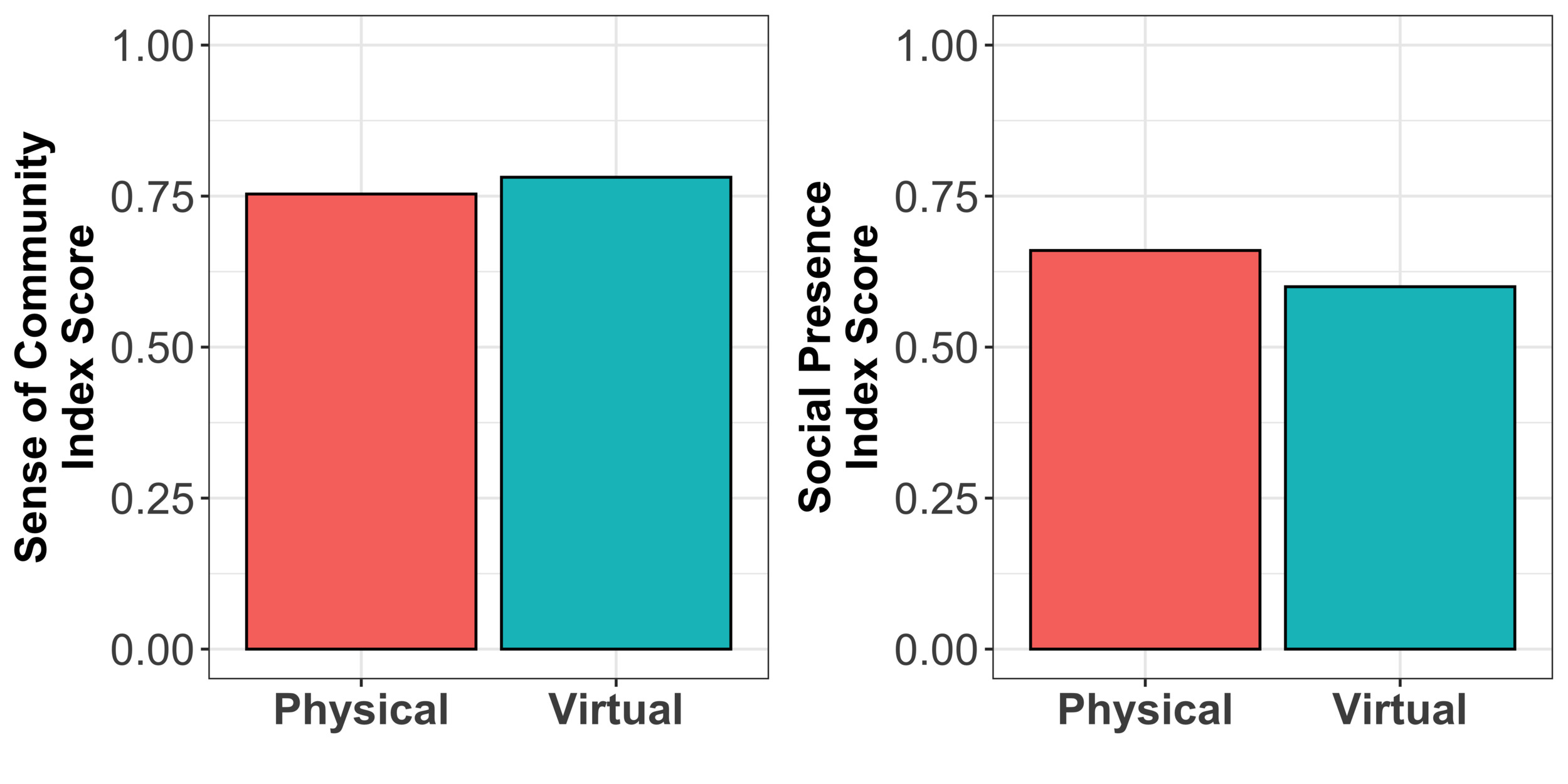
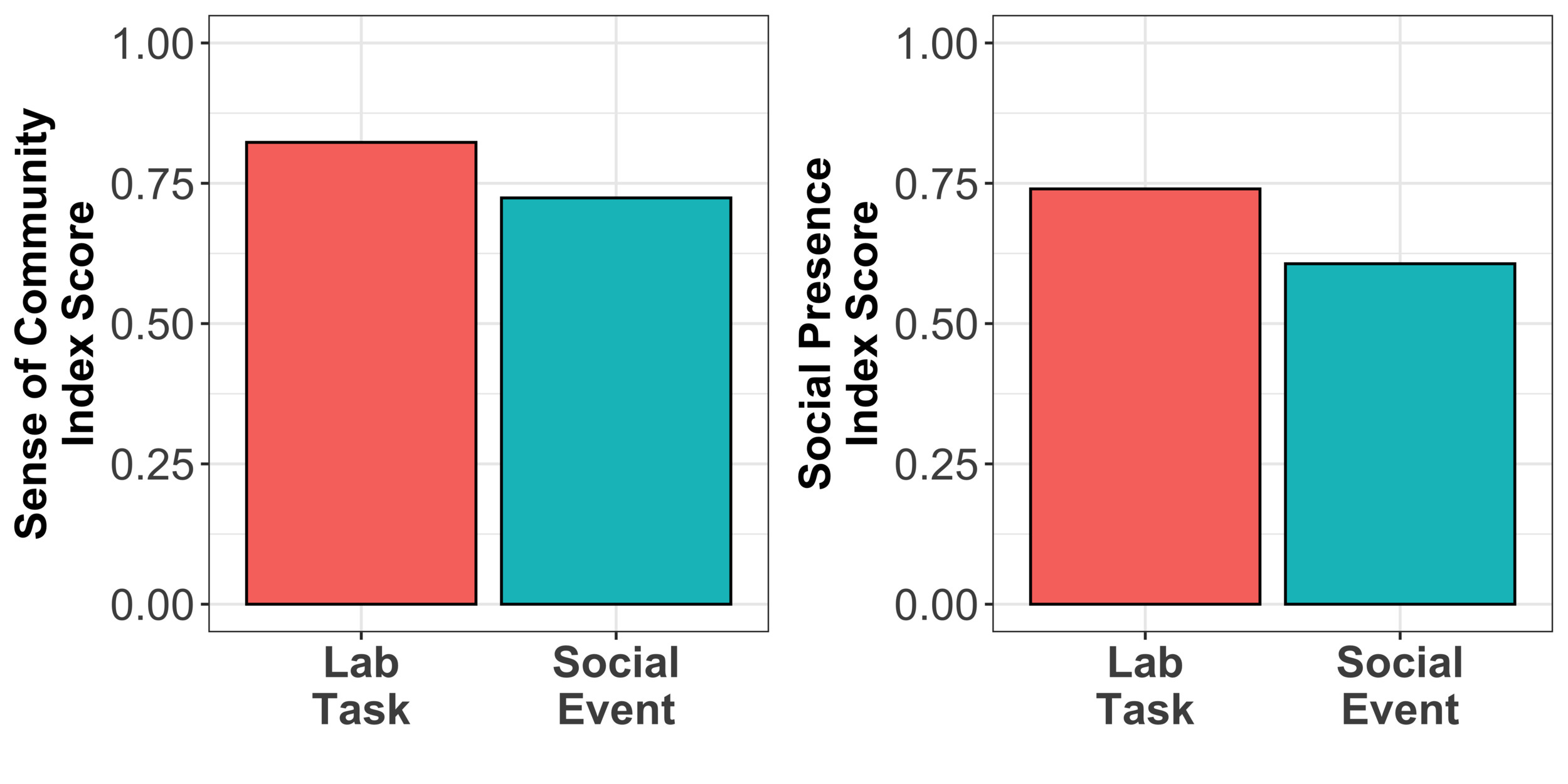
On the one hand, both the analysis of student interactions using the MR platform and student responses through the survey, in the class setting, revealed more engagement and increased sense of community and social presence among students. In particular when students worked on the laboratory activities. Students shared their thoughts and agreed that, in general, using an MR platform increased their sense of community, collaboration, and teamwork. The students reflected that this innovative platform contributed to generating a collaborative environment even during social activities. Students also highlighted that the MR platform was highly effective for remote students to feel part of the group and participate equally in the class activities. These results aligned with other studies that found better self-reported learning when students feel socially present and part of a community (Hostetter, 2013; Lim, 2023). On the other hand, students who were members of the EEC student club and participated in the virtual focus group expressed low use of the MR platform. Students are used to joining these on-campus student clubs in person; usually, they know someone else who is also interested and attends the sessions. Students’ interactions and discussions were not common during the meetings and workshop. Therefore, students did not find the MR platform to be a valuable resource for strengthening their relationships with other students. Students mentioned the need for more information and for the dissemination of the use and utility of the MR platform, not only within the EEC student club but also to other clubs and even faculty. The unstructured environment of the student club made it more difficult for both the research team and the EEC leadership to find ways for students to take advantage of using the MR platform and to improve their social presence and sense of community.
6.2. Lessons Learned Regarding Mixed Reality Across Social Learning Contexts
While deploying the MR platform across these learning contexts, we identified different ways in which MR both did and did not improve student social learning. Below we discuss the differences we identified between deploying MR within structured and unstructured learning activities. We also reflect on deploying MR in various contexts, e.g., in-person, hybrid, synchronous, and asynchronous learning contexts.
6.2.1. Supporting Structured vs Unstructured Learning Activities
When we initially deployed the MR platform in the classroom setting, which had very structured learning objectives and activities to be completed, we observed that students were much more prone to try different features of the space to meet their needs. Students would move around the virtual room into different proximity meeting configurations or switch to more permanent meeting zones to speak with the instructor. Conversely during the student club meetings, club leaders took the approach of primarily relying on the predefined meeting zones and screen-sharing prepared slides for the meeting. Students rarely used the more flexible features like the proximity chats or whiteboards in this context.
This observation seems counter intuitive at first glance. Why were more structured activities leading students to use less structured communication modalities like proximity meetings, while less structured club activities were resulting in students falling back to using more rigid predefined meeting zones? One potential reason for this inconsistency is that less structured activities engender less preconceptions about how the system could be used, resulting in the use of more obvious features so that it was clearer for others how they could engage in the activities.
We interpret this as indicating there is a clear need to work to structure early learning activities so as to scaffold learners’ MR use. In turn, we expect this to support students’ conceptualizations of how the system can be used and provide the confidence to try new configurations to meet their needs. Within the structured learning environments, all students in attendance were encouraged to engage with the system meanwhile students were granted the freedom to use the platform as they wished during the unstructured activities. Because of this, we found that the in-person student club participant who were not officers did not use the platform. With all students present in the platform during the first deployment, even those who were simultaneously physically present in-person, we observed students being playful on a regular basis in a manner that we did not observe outside of the initial club meeting of the second deployment. We interpret this as an indication that student playfulness within MR was better supported when a larger population of students were engaging with MR for both in-person and remote students.
We therefore would suggest that when deploying MR as a learning tool, researchers encourage students to actively engage with the MR learning environment. In addition, we suggest that researchers deploying MR provide structured activities encouraging students to engage with one-another through MR, rather than making the assumption that students will chose to engage using MR without any factors drawing them to it. We find this to encourage student engagement with MR both in terms of playful exploration and social engagement
6.2.2. Social Learning Contexts Where MR Can Meet Learners’ Needs
Likewise, with the design of the MR platform, we envisioned supporting geographically distributed learners, particularly in the context of the post-pandemic academic world in which hybrid and remote learning models were the predominant mediums for social learning. Throughout our deployments, it has become less clear how to support these contexts.
For example, in our first deployment we simulated a hybrid setting within a non-hybrid classroom. Although the activities performed during this deployment were hybridized, this study’s context maintained that students would all have an in-person social context both prior to and following the activities of that class. Likewise, we observed that within the context of our university, student members of the club seem to demonstrate a preference for in-person events for the social benefits of that modality. Although the MR platform was maintained as a social learning tool all semester, these students did not opt to use this tool as a virtual meeting space outside of the synchronous meetings of the club.
While working with the student club and the class, we observed that students had existing communication modalities, such as Microsoft Teams and Discord, which they used to organize events and socially engage with each other. Students usage of these platforms demonstrates established preferences for asynchronous communication modalities. This is further backed by students’ non-use of the MR platform asynchronously. This signals that targeting asynchronous use and providing a virtual social space outside of events is not within the needs of students for maintaining their academic learning communities. Instead, we suggest using MR in a targeted way to support social learning through synchronous academic events. Events such as hybrid course lectures, office hours for meeting instructors remotely, scheduled meetings for distributed groups, and providing remote support for in-person activities all represent examples of when MR may meet student needs.
7. Conclusion
In this work, we examined how engineering students’ social learning is impacted when integrating Mixed Reality into educational contexts. We examined both structured and unstructured MR usage in a diverse set of learning environments, such as simulated hybridized lab coursework and social activities, student-run club meetings and workshop events, and asynchronous learning. As a result, we found that students who are afforded the time and opportunity to playfully explore MR synchronously with their peers can more quickly identify utility and establish lasting usage patterns to fit their needs than students who are not afforded time for playful exploration. Additionally, we found that students’ perceived MR to be a tool best fit within structured contexts, rather than as a tool to replace asynchronicity. We suspect that during and after the COVID-19 pandemic, students established means for coordinating and socializing asynchronously, thus targeting asynchronous activity with MR is not a primary need of students, which we expand on in our discussion of limitations and future work below.
7.1. Limitations and Future Work
The period of time following the COVID-19 pandemic was a transitional period in academia. At this time, at least in our university, courses were shifting from being taught in a purely online format to both hybrid and in-person with optional hybrid formats. It was in the midst of this context that we envisioned the design for the MR platform as a support tool for these hybrid settings. At least in the context of our university, courses are now primarily taught with the in-person format common prior to the pandemic. Our simulated hybrid setting in the first deployment could not fully capture the broader social contexts of hybrid learning, as students were only temporarily distributed for the duration of these sessions while maintaining the social contexts of in-person learning both before and after.
Similarly, in our second deployment our target group of students used the club primarily as a social activity. Because students’ participation in the EEC was social, we found that it was primarily seen as an in-person venue, with students who tried to join remotely not taking on an active role in participating and socializing.
Another limitation of this study is that we prepared the MR platform envisioning students choosing to engage with each other outside of activities (e.g. class, club meetings, workshops, etc.). However, the MR platform was not designed with external notifications affordances, so students would need to use external communication modalities in order to organize meeting on the MR platform. We suspect that because students already have these established communication modalities, the MR platform was targeting a perceived issue that students did not actually have in the context of in-person peers and club members.
Finally, during deployment 2 we encountered a limitation in which we struggled to recruit students to participate in the focus group outside of the club activities. This means that we can only speculate as to the experiences of the students who remotely attended club activities during this deployment.
In our future work we aim to deploy the MR platform in truly hybrid class settings to assess how MR impacts student learning differently between our simulated and a truly hybrid learning environment. In an effort to reduce dedicated time being spent on student onboarding, we plan to include introductory materials so that students may asynchronously learn how to use the platform’s features. This would help students avoid spending dedicated synchronous time learning how to interact with the platform. Future work can also address supporting asynchronous learning by targeting learning communities that do not have these pre-established communication modality preferences, such as students who are physically distributed in hybrid settings, or incoming freshman students who have not yet formed or integrated with their peers in a learning community. Future work also can address this issue by implementing more asynchronous features within MR, such as the notification and conversational tools that applications such as Microsoft Teams and Discord provide.
Acknowledgments
This material is based upon work supported by the National Science Foundation under award number 2247689.
The instructor of this electrical engineering course is a member of the research team and author of this article. We ensured ethical practices and received approval from our Institutional Review Board to conduct this study inside the classroom setting.
events titled “implicit” are automatically injected into the database in the event that a user disconnects from the MR platform. (I.E. the browser tab is closed, their internet disconnects, etc.)