1. Introduction
Artificial intelligence is increasingly present in everyday life, from smartphones and virtual assistants to the content people encounter online. Yet for many users, including children, these systems remain poorly understood—recognized by what they produce rather than how they work. Leading initiatives in computing education have called for integrating AI concepts into K–12 classrooms, arguing that early exposure is essential for preparing students to navigate an AI-driven world.
A growing number of interactive tools already help children learn about AI and computing. These range from platforms that teach classification and training data to games that introduce trial-and-error learning and image generation. However, few of these tools focus on prompt engineering: the skill of writing clear, effective instructions for AI systems. Prompt engineering has become especially important for text-to-image tools, where the way a user phrases a request directly shapes the output. Writing effective prompts requires precision, creativity, and a willingness to experiment through repeated attempts.
This paper introduces PicPrompt, a collaborative game that teaches prompt engineering through AI image generation. Players write prompts, observe the AI-generated results, and evaluate each other’s guesses in a competitive, turn-based format designed for informal learning environments. Two research questions guided this work:
RQ1 (Quantitative): Does PicPrompt improve students’ self-reported ability to write effective prompts for AI image generation?
RQ2 (Qualitative): How does the game’s design encourage students to experiment with and refine their prompts?
The complete source code and deployment instructions are available at https://github.com/BryanLim0214/PicPrompt.
2. Related Work
2.1. Prompt Engineering and Generative Models
Recent advances in AI have made it possible for machines to generate images from written descriptions (Chang et al., 2023; Chen et al., 2024; Song et al., 2024). Much of this work is powered by a type of model known as a diffusion model, which learns to create images by gradually refining random noise into a coherent picture. Diffusion models are the technology behind widely used tools such as DALL-E 2, Midjourney, and Stable Diffusion (Chen et al., 2024; Vimpari et al., 2023; Yang et al., 2024). For education, these tools are valuable because they make AI tangible and immediate: a student types a sentence and instantly sees the resulting image, turning an abstract concept into a hands-on experience (Feng et al., 2023; Putjorn & Putjorn, 2023). Research on text-to-image tools indicates that they support creativity and visual communication, though producing high-quality results can be challenging and often improves through collaboration (Vimpari et al., 2023). Because the quality of the generated image depends heavily on how well the user crafts the prompt, learning to prompt effectively is both a practical skill and a window into how AI interprets language.
2.2. Game-Based Learning and AI Literacy
Research on game-based learning indicates that interactive tools are most effective when students create something and receive feedback from peers in real time (Williams et al., 2024). Collaborative activities help students develop both technical and social skills simultaneously (Druga et al., 2022). For K–12 students in particular, early hands-on experience with AI supports the development of critical thinking alongside technical knowledge (Putjorn & Putjorn, 2023). Games that incorporate peer evaluation have proven especially effective at sustaining engagement among younger learners working with challenging material (Hinojosa et al., 2025). Generative AI in the classroom also provides students with a creative outlet while introducing them to computational concepts (Mahdavi Goloujeh et al., 2024).
Despite the growing availability of AI tools, many users—including children—still recognize AI by what it produces rather than how it works (Ariza et al., 2025; Lee et al., 2025). The AI4K12 initiative has advocated for integrating AI concepts into K–12 classrooms to address this gap (Touretzky et al., 2019). A range of platforms have responded to this call. Google Teachable Machine (Carney et al., 2020), Machine Learning for Kids (Lane, 2021), and AI + Ethics curriculum modules (Williams et al., 2023) have shown that ideas like classification and training data can be made accessible to younger audiences. PlayGrid offers an easy-to-use interface for AI literacy (Quiloan et al., 2023), AI Chef Trainer shows why good training data matters (Movahed & Martin, 2025), and DiffusionDemo (Rao & Touretzky, 2025) walks users through how image generation models work. While these tools cover a range of AI topics, few specifically target the skill of writing effective prompts—the focus of PicPrompt. PicPrompt brings these ideas together by combining prompt writing practice, AI-generated visual feedback, and collaborative gameplay in a single tool designed for informal learning settings.
3. Design of PicPrompt
3.1. Concept and Rationale
PicPrompt was designed as a collaborative, turn-based game where learning happens through play. Inspired by Pictionary, players take turns generating images from written prompts while others try to guess what the prompt said. This setup encourages creative expression and communication while reinforcing the need for clear, precise language. The design draws on the idea that prompt writing improves through repeated cycles of creating, testing, and refining (Haugsbaken & Hagelia, 2024). Putting this process inside a game lets students explore how AI responds to language without the pressure of a formal lesson.
3.2. System Architecture and Interface
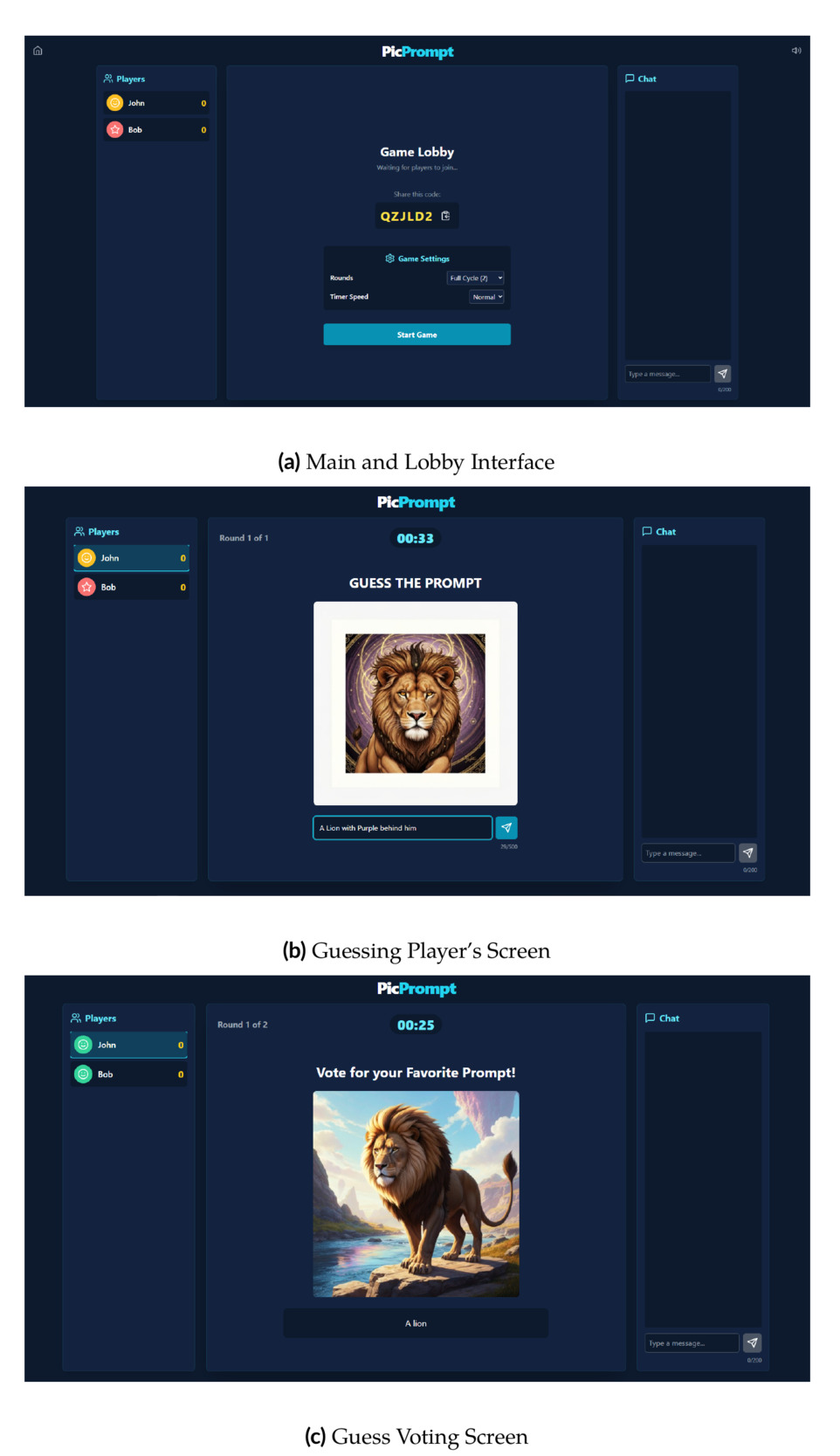
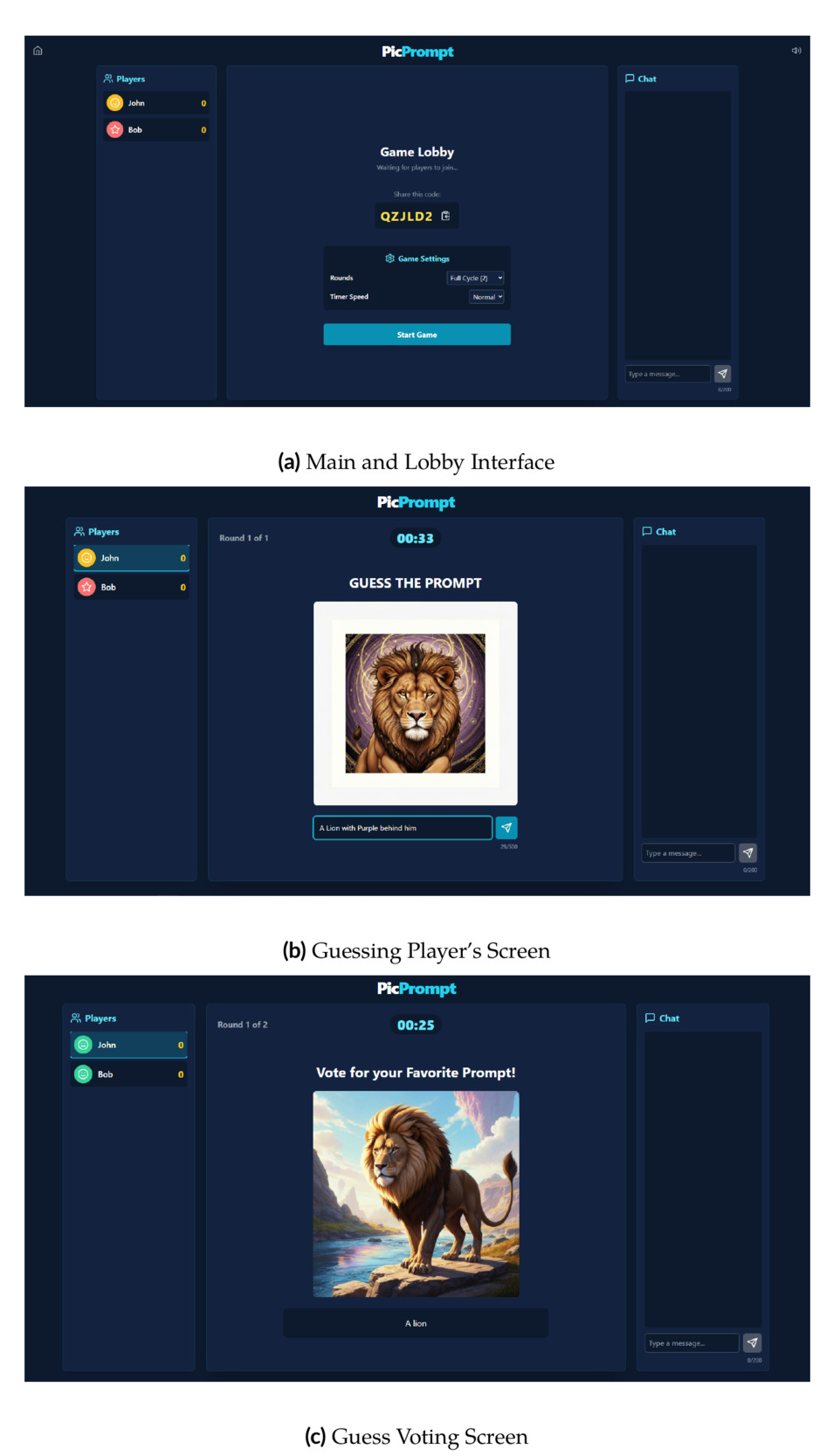
The game’s front end uses React with WebSocket connections so all players see updates in real time. The back end runs on Node.js and manages player sessions, game progress, and prompt processing. Firebase Firestore handles data storage and keeps gameplay smooth. The system supports multiple game rooms running at the same time, so several groups in a classroom can each play their own game. For image generation, PicPrompt uses the Google Imagen 3 API through the Replicate platform. This model produces high-quality images from text descriptions (Chen et al., 2024; Yang et al., 2024). When a player submits a prompt, the API returns a generated image that all players see during the guessing phase. Figure 2 shows screenshots of the PicPrompt interface.
4. Gameplay
Each round of PicPrompt has two phases: one player writes a prompt, and then everyone else tries to guess what it said.
4.1. Game Rules and Structure
At the start of each round, one player is randomly chosen as the Prompter. Once someone has been Prompter, they do not get that role again, so everyone gets a turn. The Prompter has a set amount of time to type a prompt describing the image they want. The prompt goes to the Google Imagen 3 API, which generates the image.
Once the image appears, the game moves to guessing. All players except the Prompter have a set amount of time to submit their best guess for what the original prompt said. After every guess is in, each one is displayed on screen and players vote on which guess they think is closest to the original. The Prompter’s actual prompt is then revealed, the guess with the most votes earns a point, and play continues until every student has had a turn as Prompter. The player with the most points wins. The clear structure, time pressure, and scoring create friendly competition that keeps students engaged. As Feng et al. (2023) note, text-to-image tools work well for encouraging both creative exploration and learning from peers.
4.2. User Interaction and Feedback
PicPrompt includes a built-in chat so students can talk during the game, share their thinking, and discuss what they see in the AI-generated images. This helps students learn from each other and think out loud about why certain prompts produce certain results. Voting adds another layer of learning. When players pick which guess they think is closest to the original prompt, both sides benefit. The guessers learn what parts of the image were easy or hard to describe, and the Prompter sees whether their words got the idea across. This kind of peer feedback has been shown to work well in similar tools like Doodlebot (Williams et al., 2024).
4.3. Prompt Engineering as a Learning Process
Over multiple rounds, students naturally start to see prompt writing as a process of trying, learning, and improving. This hands-on cycle of writing, seeing the result, and adjusting matches what researchers call iterative refinement in prompt engineering (Haugsbaken & Hagelia, 2024). Students quickly notice that small changes in wording can lead to very different images, which helps them understand how word choice and detail level affect what the AI produces. Rather than just looking at whether the image is “good,” students start paying attention to why it turned out the way it did.
5. Methods and Context
5.1. Study Context and Participants
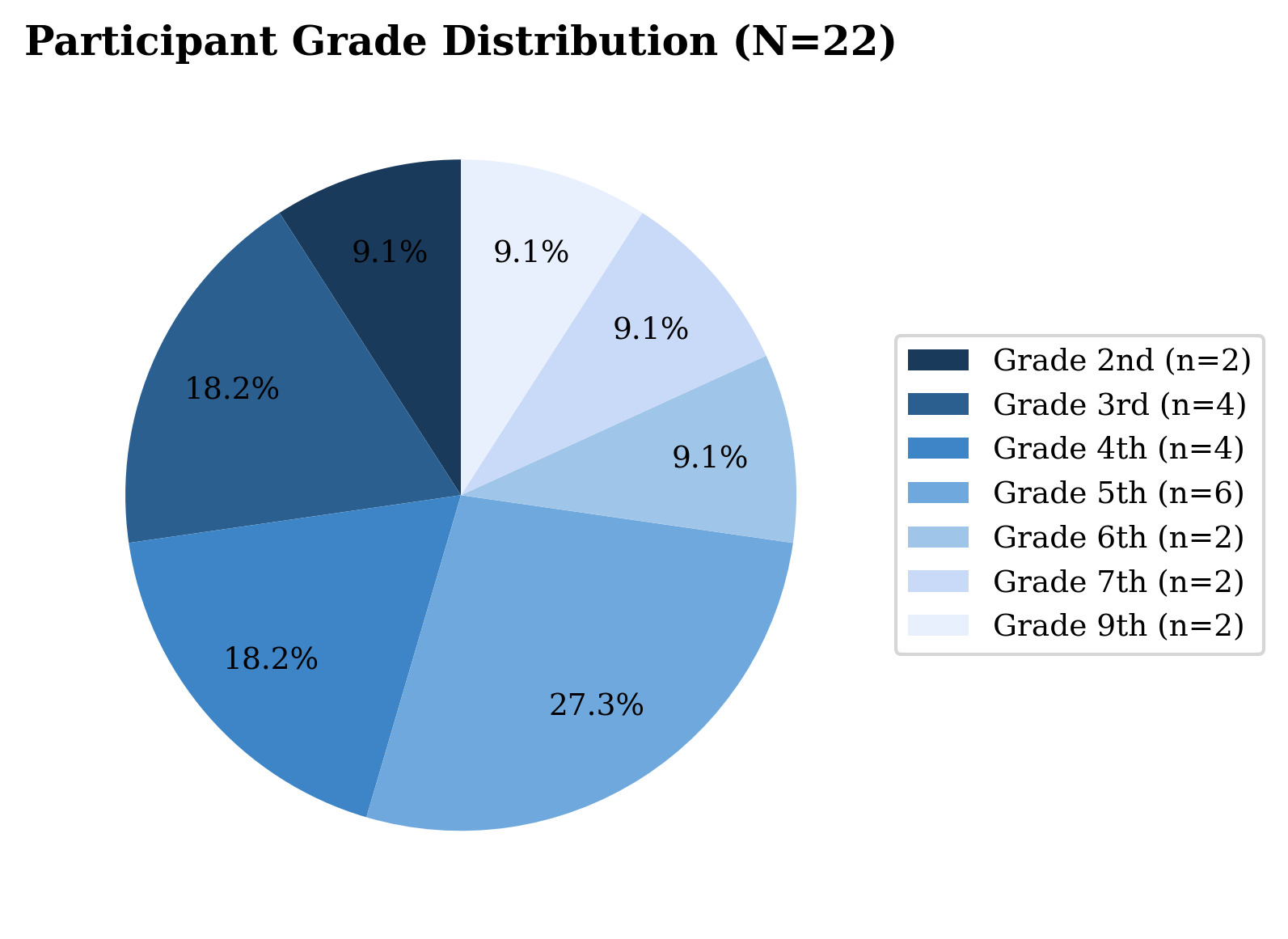
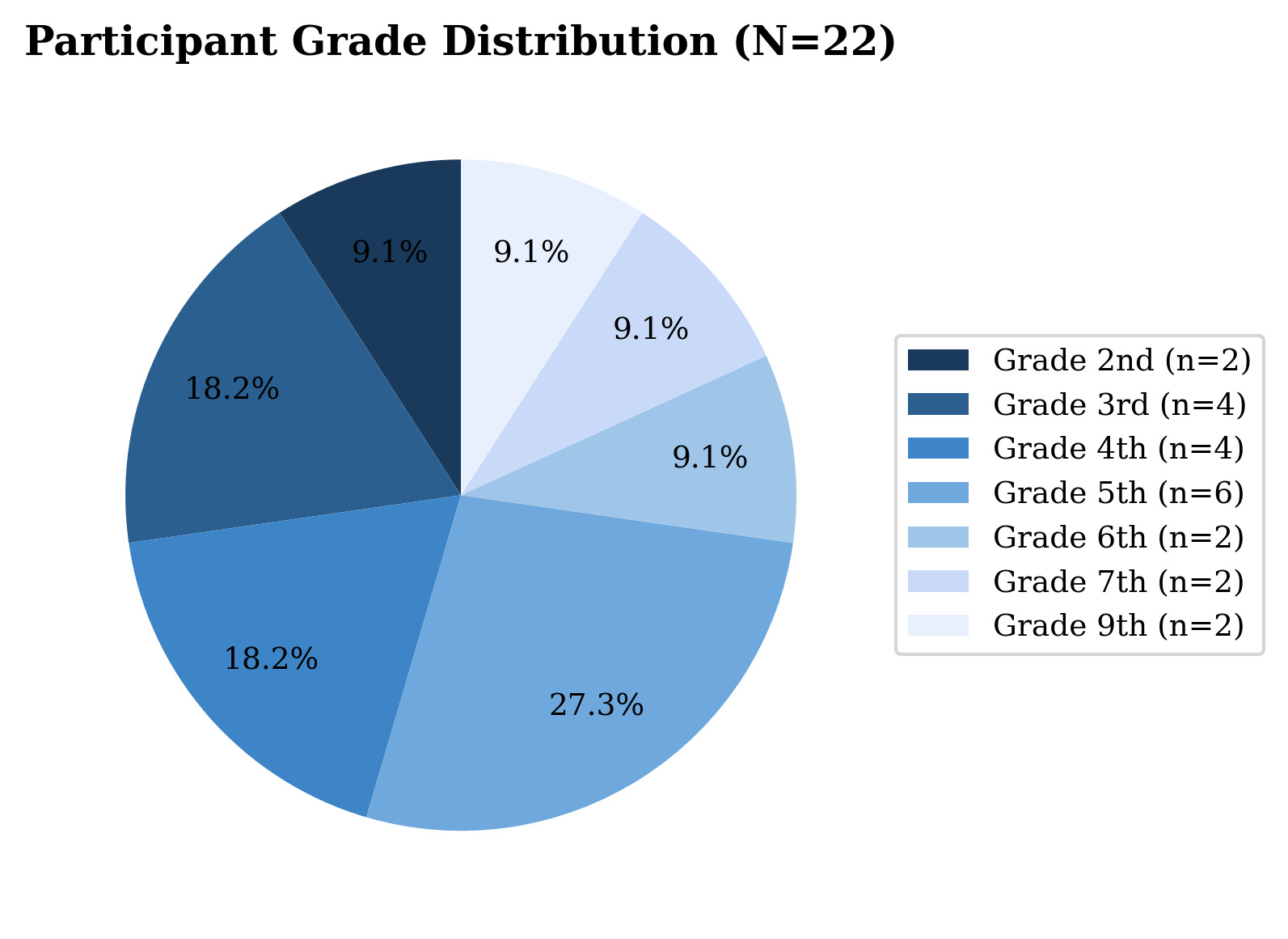
We conducted a preliminary study at a partner educational site, with sessions held on three separate dates in early February 2026. A total of 22 students participated, ranging from 2nd through 9th grade. This age range is wider than our original target of middle school students (grades 6–8), which provided an initial look at how both younger and older students interact with the tool, though it also means that students at different developmental stages were grouped together. Table 1 and Figure 3 present the grade distribution. The largest group was 5th graders (27.3%, followed by 3rd and 4th graders (18.2% each,
All three sessions drew students from across the full grade range rather than from a single grade band. A typical session included students from the lower grades (2nd through 4th) playing alongside students from the upper grades (5th through 9th), and we did not sort participants into age-similar groups before play. We discuss what this likely meant for the participant experience in the Limitations section.
5.2. Study Design
We used a pre-post design with no separate control group. Students completed a survey before playing PicPrompt and a second survey afterward, both administered through Google Forms. The surveys combined rating-scale and multiple-choice items with open-ended written responses. With 22 participants, no comparison condition, and a wide grade range, we treat the study as exploratory. The results offer early signals about how students respond to the tool rather than firm conclusions about its effectiveness.
5.3. Survey Instruments
The pre-survey contained 8 items assessing students’ existing knowledge of AI and prompt writing. The post-survey contained 13 items covering perceived learning gains, confidence, strategies acquired, enjoyment, and self-reported improvement in prompt writing. The complete set of survey items is presented below.
We gave the same survey to every student regardless of grade. Items used plain wording, and Likert anchors used everyday phrases such as “I’ve never heard of it” rather than abstract labels like “Unfamiliar.” Researchers were on hand during both surveys to read items aloud and explain wording for younger students who needed help. We did not produce age-specific versions of the survey, and we discuss this choice further in the Limitations section.
5.3.1. Pre-Survey (8 Items)
-
First name. [Short answer]
-
Last name. [Short answer]
-
What grade are you in? [Multiple choice]
-
How much do you know about AI (Artificial Intelligence)? [Likert 1–5] 1 = I’ve never heard of it; 2 = I’ve heard of it but don’t know what it does; 3 = I know a little bit about it; 4 = I know some things about it; 5 = I know a lot about it.
-
How much do you know about writing prompts (instructions) for AI? [Likert 1–4] 1 = I’ve never done this before; 2 = I know a little bit about it; 3 = I know some things about it; 4 = I’m good at it.
-
What makes a GOOD prompt (instruction) for AI to create an image? [Select all that apply] Using lots of fancy words; Being specific and detailed; Using short, simple words; Describing colors and shapes; Using only one or two words; I don’t know.
-
Imagine you want AI to create a picture of your dream bedroom. What would you tell the AI? Write 2–3 sentences. [Open text]
-
If AI creates a weird or wrong image, what would you do? [Choose one] Write the exact same prompt again; Change a few words and try again; Give up and try something else; Add more details to the prompt; I’m not sure.
5.3.2. Post-Survey (13 Items)
-
First name. [Short answer]
-
Last name. [Short answer]
-
What grade are you in? [Multiple choice]
-
After playing PicPrompt, how much do you know about AI? [Likert 1–5] 1 = I still don’t know much; 2 = I know a little more now; 3 = I learned some new things; 4 = I learned a lot of new things; 5 = I learned SO much!
-
After playing PicPrompt, how much do you know about writing prompts (instructions) for AI? [Likert 1–4] 1 = I still don’t know much; 2 = I learned a little bit; 3 = I learned some new things; 4 = I’m good at it now.
-
While playing PicPrompt, what did you notice helped create better images? [Select all] Using complicated or difficult words; Adding specific details to my prompts; Keeping my prompts clear and simple; Including colors, shapes, and sizes; Writing very short prompts with few words; I’m still figuring it out.
-
When the AI created an image that didn’t match what you wanted, what worked best? [Choose one] Trying the same prompt again without changes; Changing just a few words in my prompt; Giving up and starting with a completely different idea; Adding more specific details to my prompt; I didn’t notice a pattern.
-
How confident are you now at writing prompts for AI? [Likert 1–4] 1 = Not confident; 2 = A little confident; 3 = Pretty confident; 4 = Very confident.
-
Which strategies did you learn while playing PicPrompt? [Select all] Be more specific with details; Use describing words (adjectives); Think about what the AI needs to know; Test and change your prompt if needed; Keep prompts short and simple; Add information about colors, size, or style.
-
How fun was PicPrompt? [Likert 1–5] 1 = Not fun at all; 2 = A little fun; 3 = Pretty fun; 4 = Really fun; 5 = Super fun!
-
Would you recommend PicPrompt to other students? [Choose one] Definitely yes!; Probably yes; Maybe; Probably not; Definitely not.
-
What part of PicPrompt helped you learn the most about writing prompts for AI? Write 1–2 sentences. [Open text]
-
Now that you’ve played PicPrompt, if you wanted AI to create a picture of your dream bedroom, what would you tell it? Write 2–3 sentences. [Open text]
5.3.3. Question Mapping for Paired Comparisons
We paired matching questions from the pre- and post-surveys to compare responses before and after gameplay. Pre-Q4 and Post-Q4 both ask about AI knowledge, Pre-Q5 and Post-Q5 ask about prompt writing knowledge (our main outcome), Pre-Q6 and Post-Q6 ask which strategies students recognize as effective, Pre-Q8 and Post-Q7 ask how students handle errors, and Pre-Q7 and Post-Q13 both ask students to write a sample prompt. We also analyzed several post-only measures including confidence (Post-Q8), strategies learned (Post-Q9), fun rating (Post-Q10), recommendation rate (Post-Q11), and what feature helped most (Post-Q12).
One pairing deserves special attention. The pre-survey AI item asks how much students know about AI, while the post-survey item asks how much they learned from the game. These tap related but different ideas, and we revisit how this affects interpretation in the Findings and Limitations sections.
5.4. Analysis Methods
For the rating-scale questions, we used paired -tests—a standard method for comparing the same group’s scores at two different time points—to determine whether students’ responses changed from pre- to post-game. To confirm these results with a method that makes fewer assumptions about how the data are distributed, we also ran Wilcoxon signed-rank tests, which compare the same pairs of scores but do not require the data to follow a bell-shaped curve. For the multiple-choice strategy and error-handling questions, where answers fall into categories rather than numerical scales, we used McNemar’s test, which checks whether the same students switched their answers from one category to another after playing. Throughout this paper, we report -values, which indicate the probability of observing a result as large as ours if there were truly no difference; a -value below .05 is the conventional cutoff for considering a result statistically significant. We also report Cohen’s , a measure of effect size that describes how large the difference is regardless of sample size—values around 0.2 are considered small, 0.5 medium, and 0.8 large. For the open-ended “dream bedroom” prompt (Pre-Q7 and Post-Q13), two raters independently scored each response on three dimensions, each rated 1 to 4: (1) number of details, (2) use of descriptive words, and (3) specificity about colors, sizes, and styles. Total scores ranged from 3 to 12. We grouped the Post-Q12 open-ended responses by theme to identify which game features students found most helpful.
5.5. AI Tool Use Disclosure
In accordance with the journal’s guidelines on AI tool use, we disclose that Claude (Anthropic) was used to assist with formatting the statistical analysis report and generating data visualizations from verified survey data. All text, figures, and statistical results were reviewed, verified, and corrected by the authors. The AI tool was not used to collect, fabricate, or interpret research data. All conclusions and interpretations are the authors’ own.
6. Findings
6.1. Pre-Game Baseline
6.1.1. General AI Knowledge (Pre-Q4)
Most students entered the study with at least some awareness of AI. The most common response was “I know a lot about it” (36.4%, followed by “I know some things about it” (31.8%, On the lower end, 13.6% knew “a little bit,” 9.1% had “heard of it but don’t know what it does,” and 9.1% had “never heard of it.” The average rating was 3.77 out of 5 (standard deviation meaning most students’ responses fell within about 1.3 points of the average).
6.1.2. Prompt Writing Knowledge (Pre-Q5)
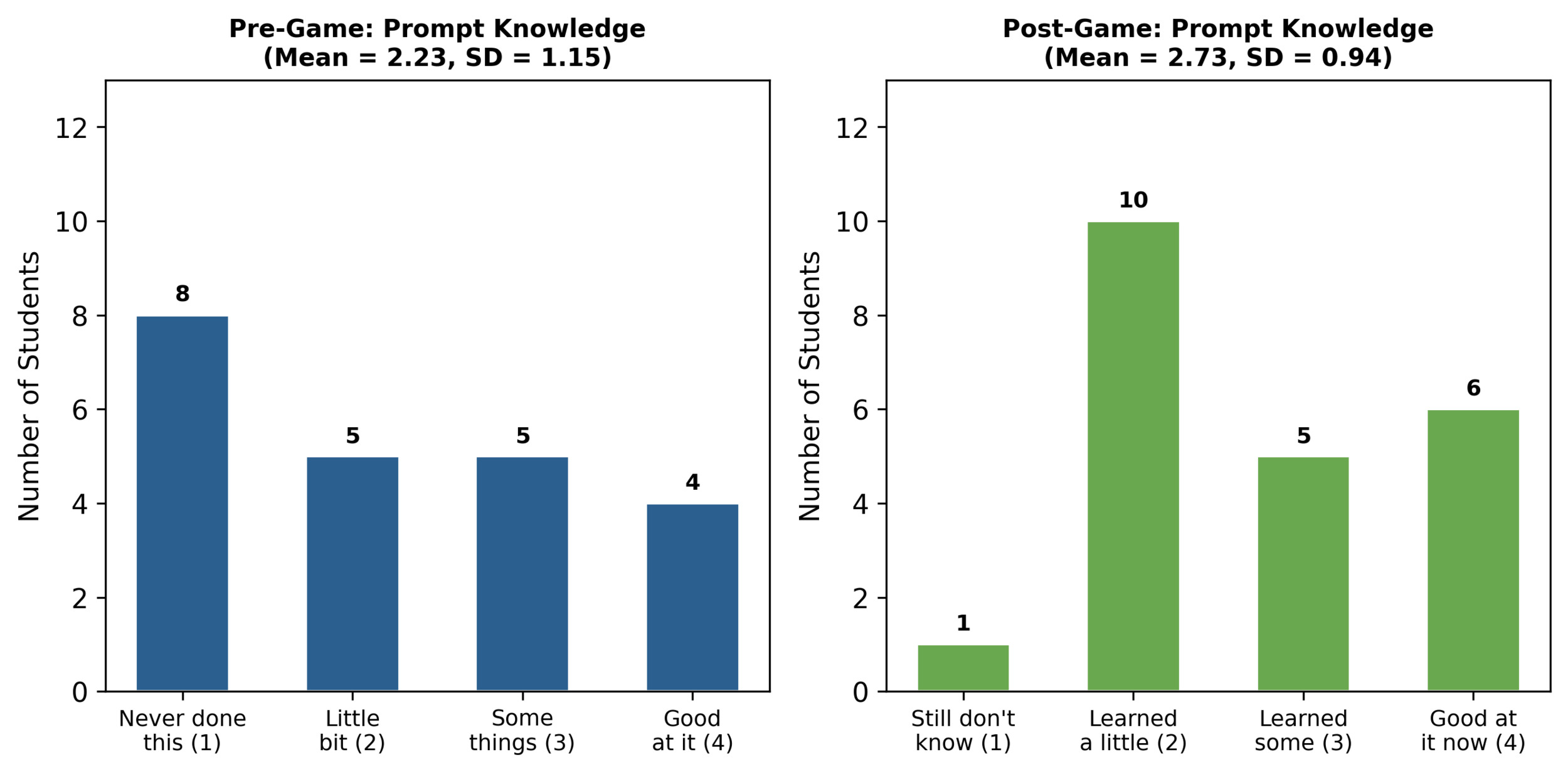
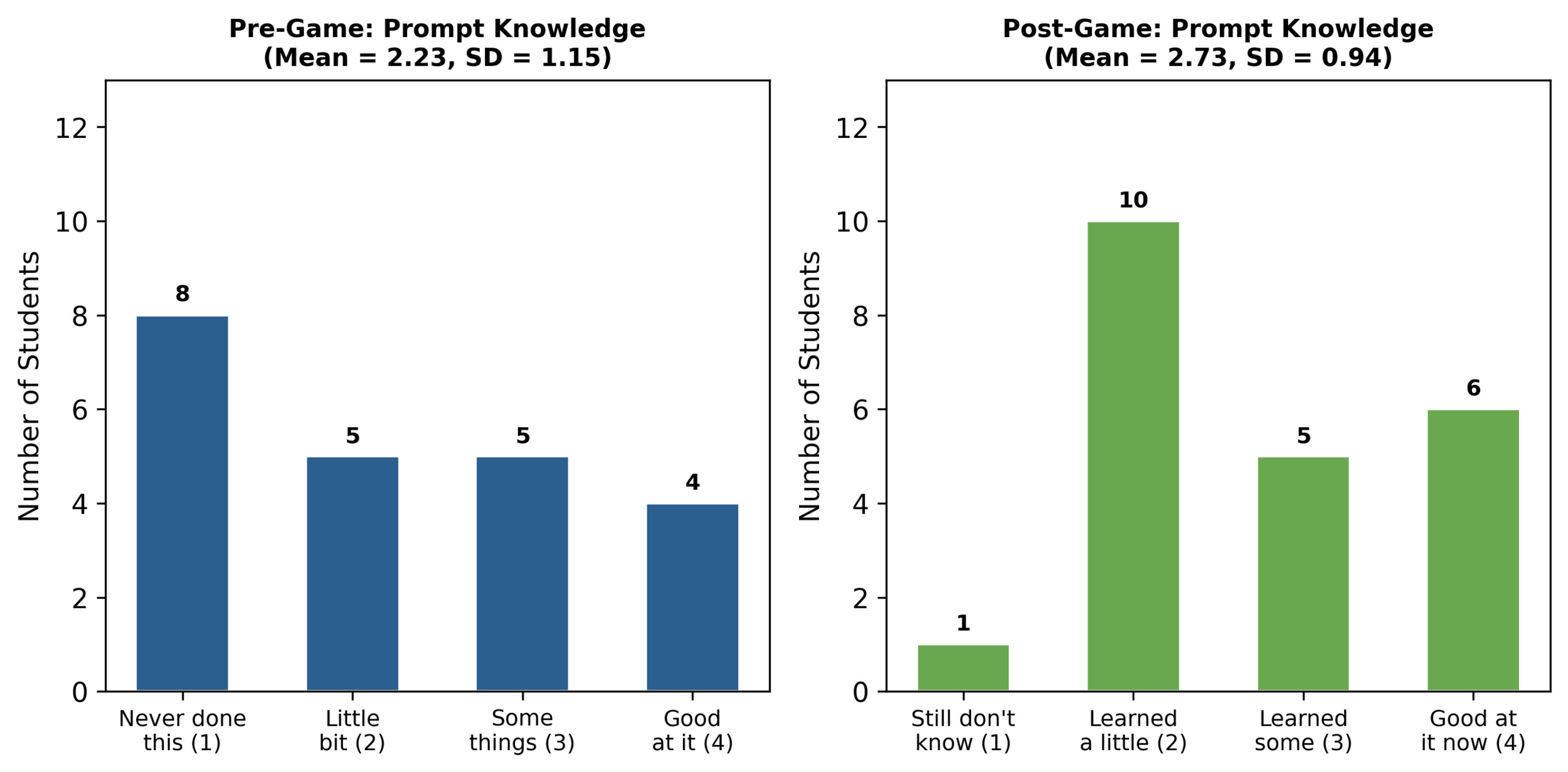
Even though many students knew about AI in general, far fewer had experience writing prompts. Over a third (36.4%, had “never done this before,” 22.7% knew “a little bit,” another 22.7% knew “some things,” and only 18.2% said they were “good at it.” The average was 2.23 out of 4 This gap between knowing about AI and knowing how to use it is exactly what PicPrompt was designed to address.
6.1.3. Beliefs About Good Prompts (Pre-Q6)
Students could pick more than one answer. The most popular choice was “Being specific and detailed” (59.1%, followed by “Describing colors and shapes” (50.0%, Almost half (40.9%, chose “I don’t know,” meaning they had no idea what makes a prompt effective before playing. Only 1 student (4.5%) picked the incorrect option “Using only one or two words” and no students chose “Using lots of fancy words.”
6.1.4. Error-Handling Strategy (Pre-Q8)
When asked what they would do if AI produces a wrong image, students chose between helpful and unhelpful strategies. The largest group (45.5%, chose “Add more details to the prompt” and 40.9% chose “Change a few words and try again.” Together, 86.4% chose a helpful strategy. Only 4.5% chose “Give up” and 9.1% said “I’m not sure.”
6.2. Post-Game Outcomes: Primary Outcome
6.2.1. Prompt Writing Knowledge (Pre-Q5 vs. Post-Q5)
Figure 4 shows how students rated their prompt writing knowledge before and after playing. The average rose from 2.23 to 2.73 on the 4-point scale, a gain of half a point. Before the game, 36.4% of students had never written a prompt; afterward, only 4.5% said they “still don’t know much.” The largest post-game group was “I learned a little bit” (45.5%, followed by “I’m good at it now” (27.3%, and “I learned some new things” (22.7%,
Statistically, this improvement did not reach the conventional cutoff for significance Cohen’s and a secondary Wilcoxon test confirmed the same pattern The consistent upward trend and the moderate effect size (a of 0.35 falls between small and medium) are consistent with a real improvement, but only a larger study can confirm one. We treat the result as a preliminary signal that warrants a properly powered follow-up.
6.3. Post-Game Outcomes: Secondary Measures
6.3.1. AI Knowledge (Pre-Q4 vs. Post-Q4)
The average AI knowledge score went from 3.77 before the game to 3.27 after, but the two ratings are not directly comparable. The pre-survey asked “how much do you know” about AI, while the post-survey asked “how much did you learn” from playing. These wordings tap related but different ideas. A student who already knew a lot about AI before the game would still rate “how much do you know” high, but on the post-survey would have to rate how much new information they picked up from one activity, which for that student would reasonably be lower. We do not read the apparent decline as a real loss of AI knowledge, and we treat this comparison as uninformative for our research question. The wording will be corrected in future iterations of the survey.
6.3.2. Strategy Recognition (Pre-Q6 vs. Post-Q6)
Before the game, 59.1% picked “Being specific and detailed” as an effective strategy. After the game, 54.5% picked the matching option “Adding specific details to my prompts.” The difference was not significant Looking at individual students, 10 chose the correct answer both times, 3 went from correct to incorrect, 2 went from incorrect to correct, and 7 were incorrect both times. This suggests that students already had a decent sense of what makes a good prompt before they started playing.
6.3.3. Error-Handling Strategy (Pre-Q8 vs. Post-Q7)
Before the game, 86.4% chose a helpful error-handling approach. After playing, this dropped to 59.1% The change was not statistically significant Six students chose “Giving up and starting with a completely different idea” after the game, compared to just one before. This may actually reflect something positive: after real experience, some students realized that sometimes it is better to scrap a bad prompt and start over than to keep tweaking it. We revisit this in the Discussion.
6.3.4. Post-Game Confidence (Post-Q8)
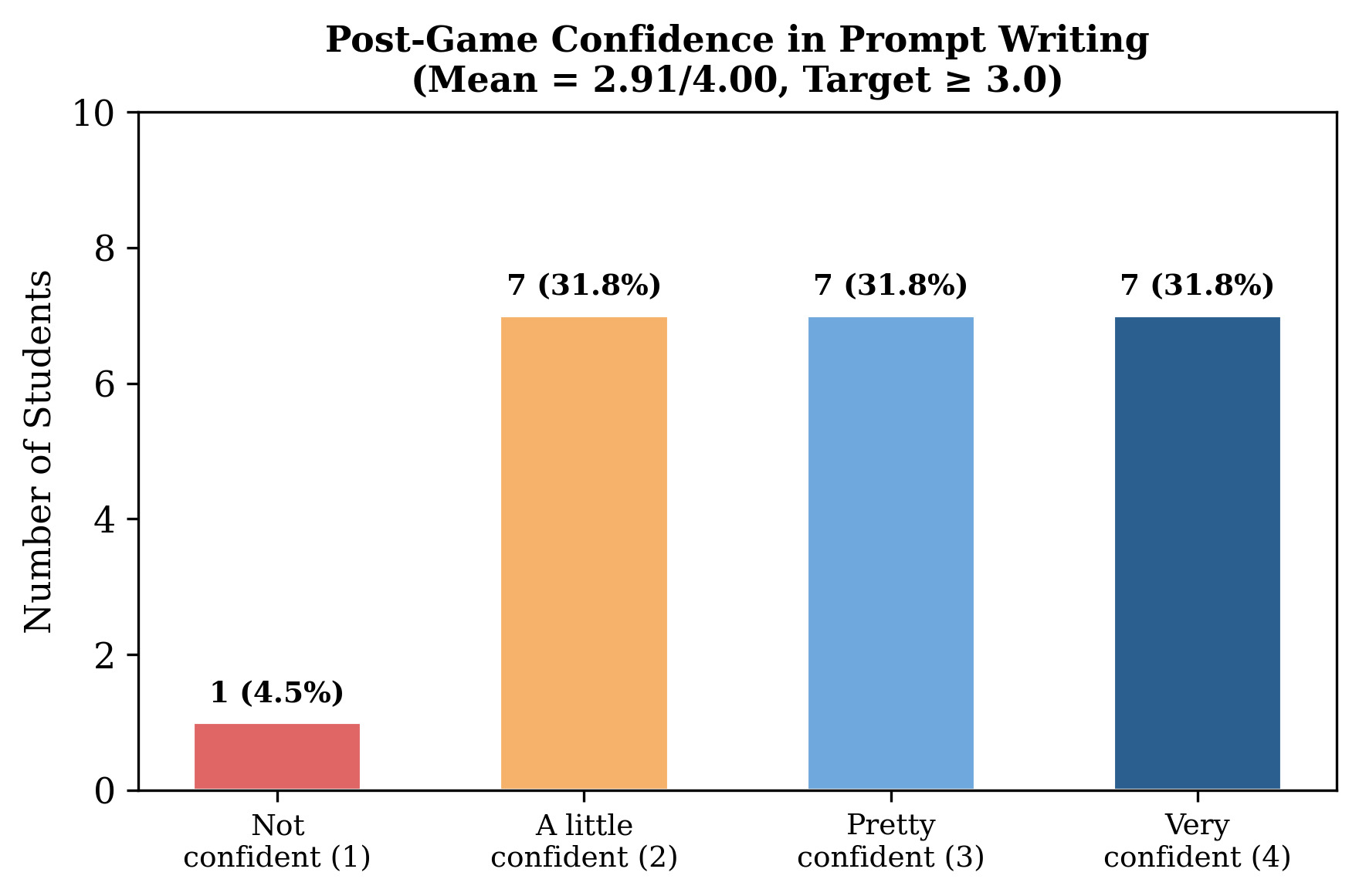
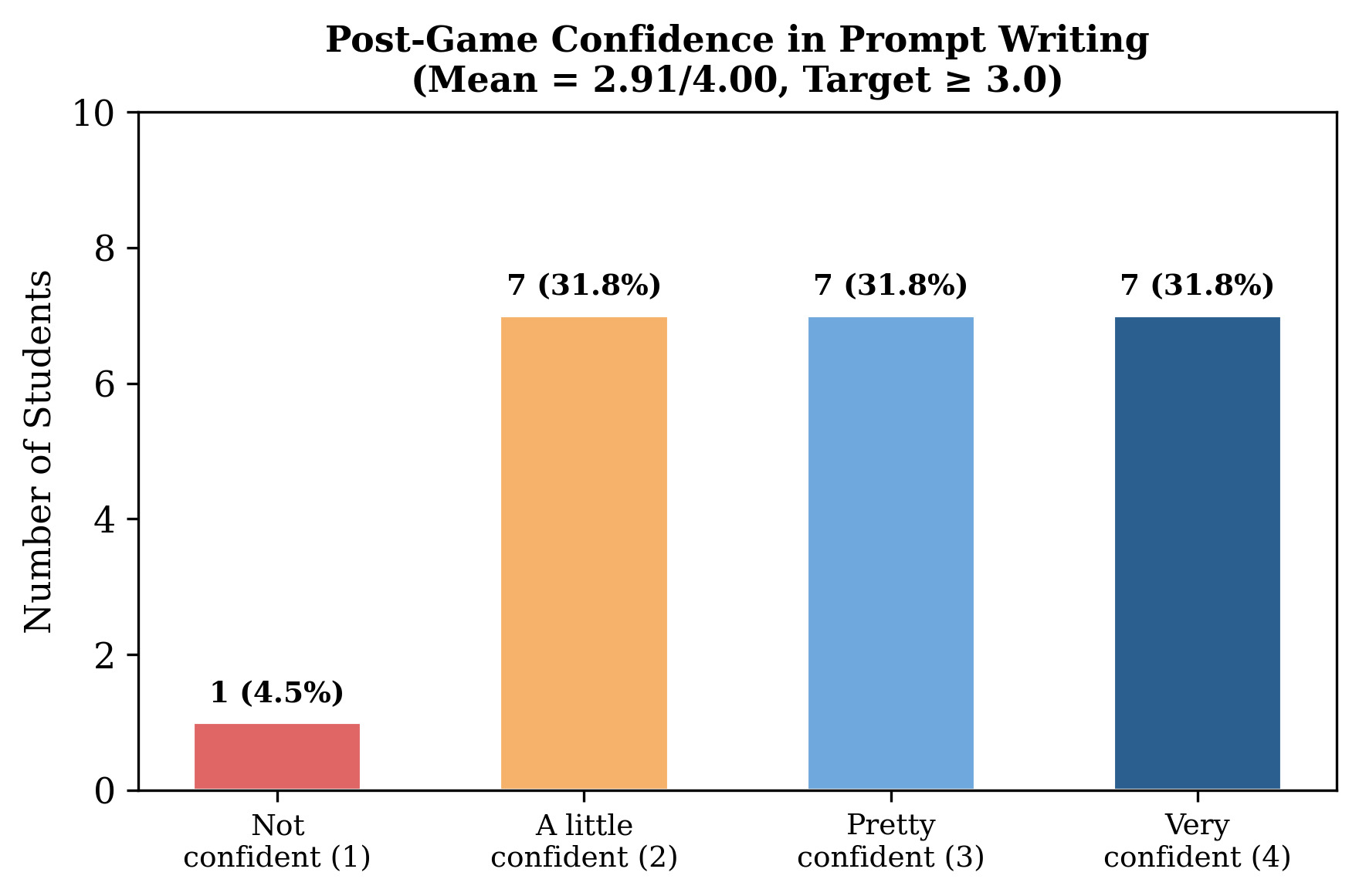
Figure 5 shows how confident students felt about writing prompts after playing. Responses were spread fairly evenly: 31.8% each said “very confident,” “pretty confident,” and “a little confident,” and only one student (4.5%) said “not confident.” The average was 2.91 out of 4 just below our goal of 3.0 or higher.
6.3.5. Strategies Learned (Post-Q9)
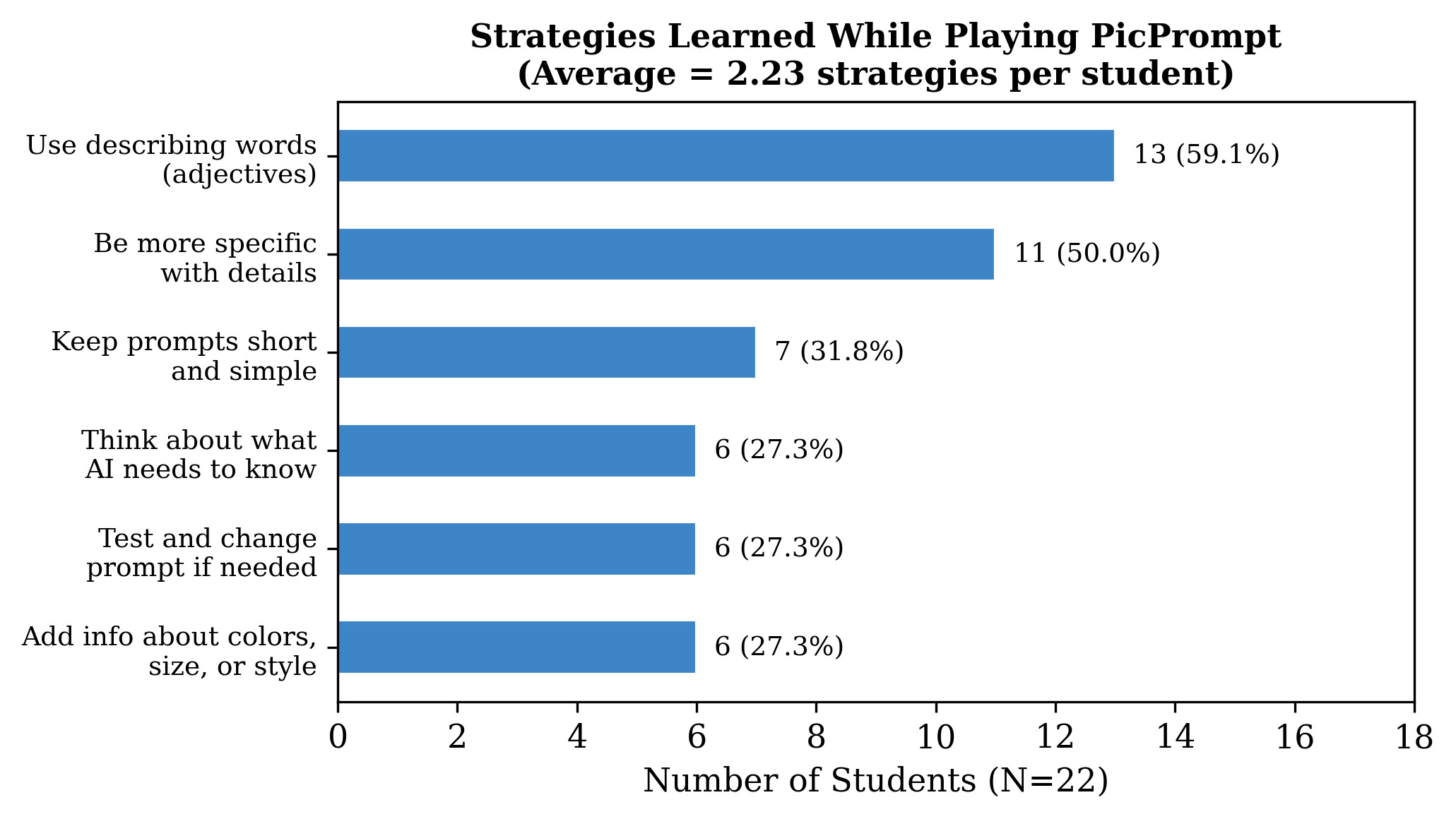
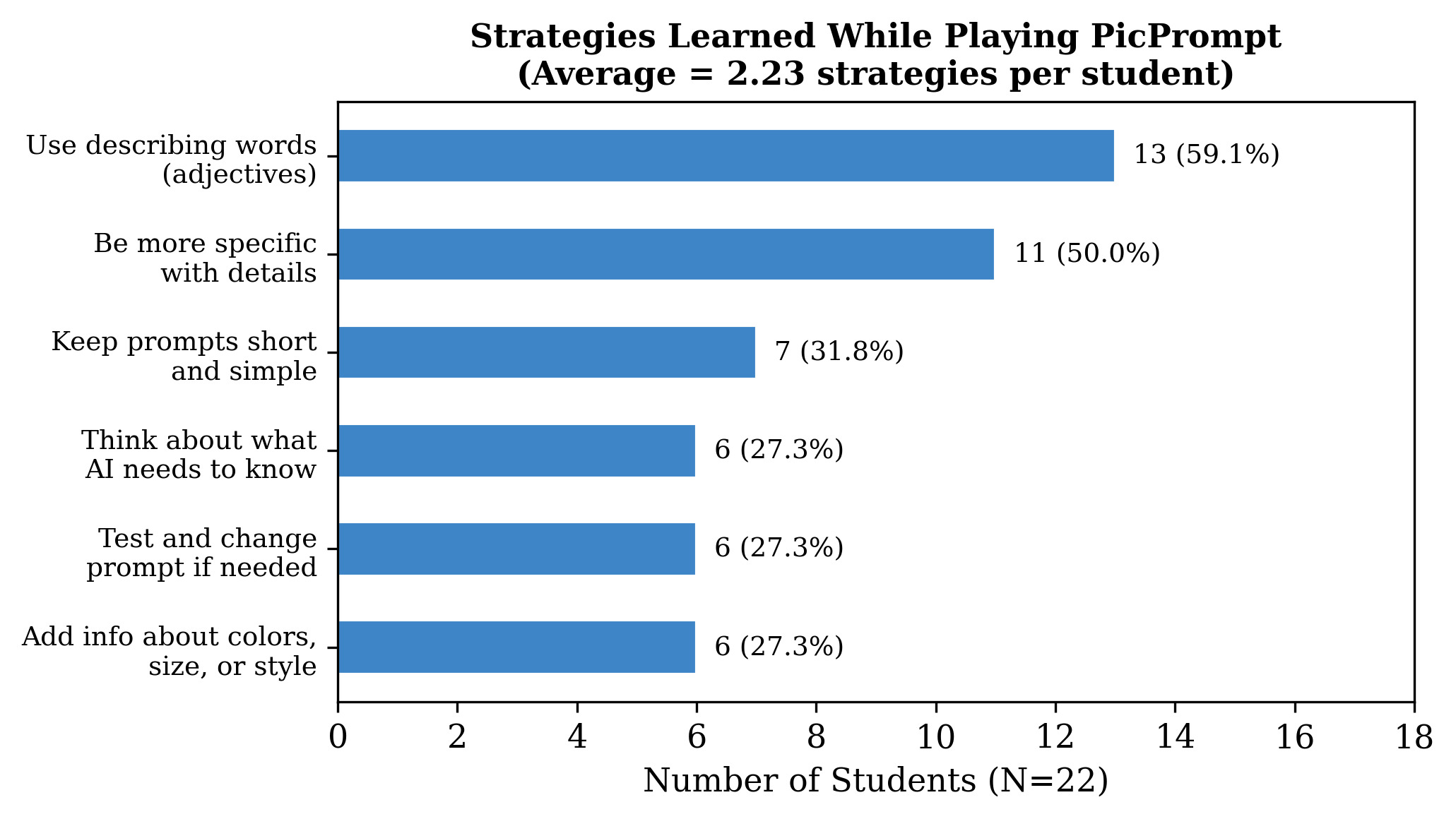
Figure 6 shows which strategies students reported learning. The most common was “Use describing words (adjectives)” (59.1%, followed by “Be more specific with details” (50.0%, The remaining strategies were each chosen by roughly a quarter of students: “Keep prompts short and simple” (31.8%, “Think about what the AI needs to know” (27.3%, “Test and change your prompt if needed” (27.3%, and “Add information about colors, size, or style” (27.3%, On average, students reported 2.23 strategies, below the goal of 3.0, though every student reported learning at least one.
6.3.6. Engagement: Fun Rating (Post-Q10)
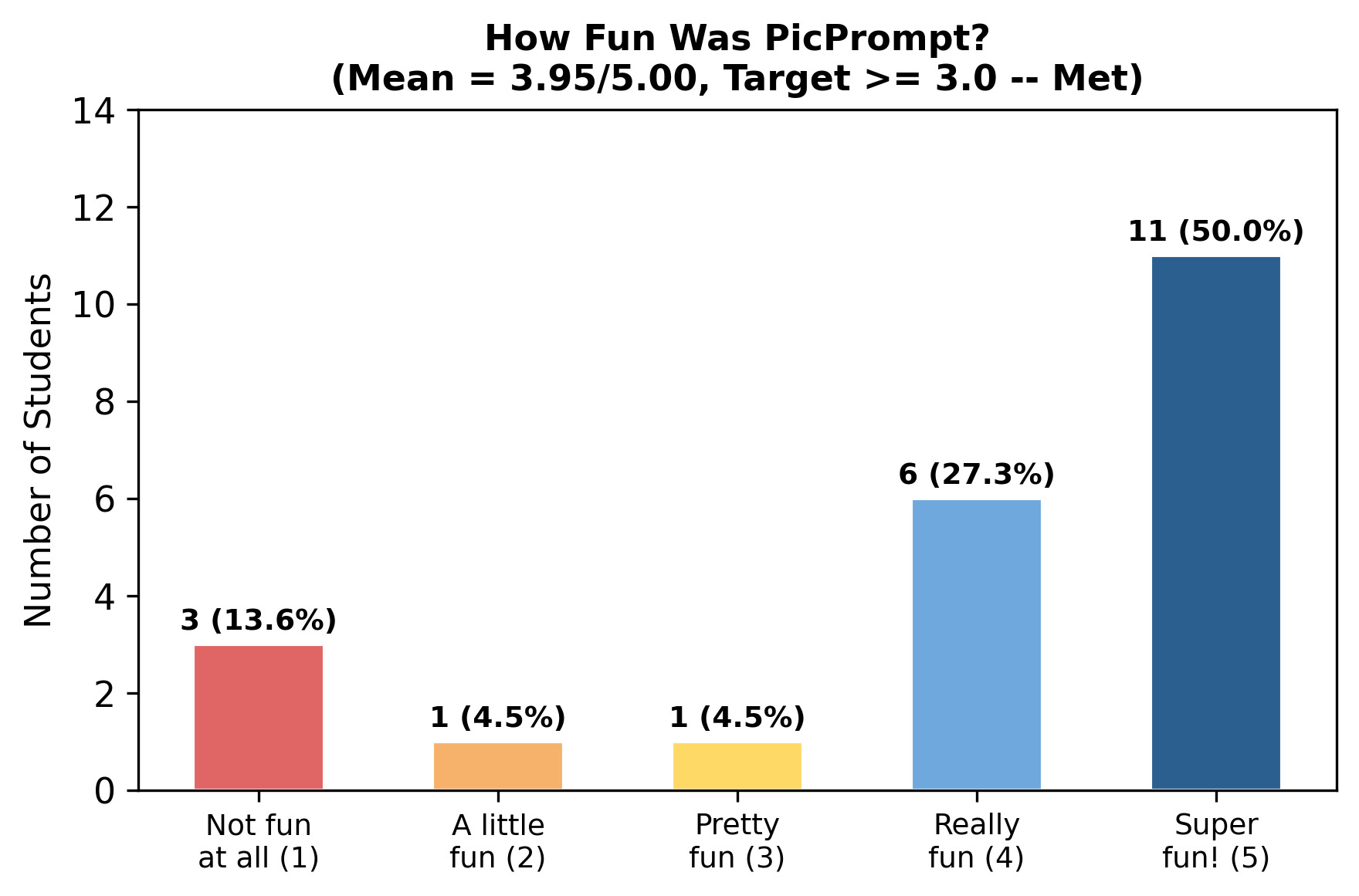
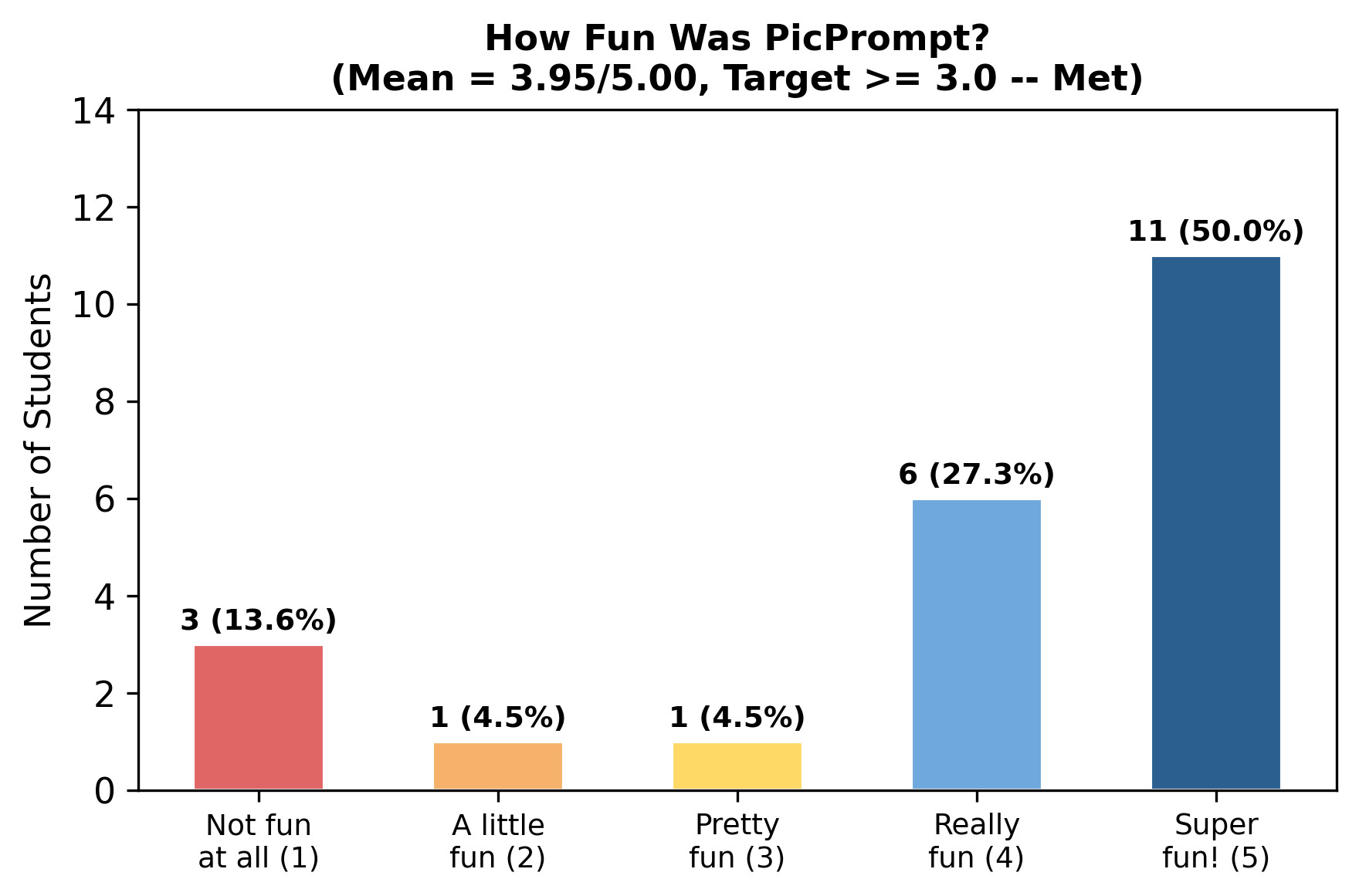
Figure 7 shows the fun ratings. Half of all students (50.0%, gave PicPrompt a perfect 5 out of 5, and another 27.3% rated it 4. On the other end, 13.6% rated it 1, one student rated it 2, and one rated it 3. The average was 3.95 out of 5 well above our goal of 3.0. The wide spread in responses shows that while most students enjoyed the game, a small group did not.
6.3.7. Recommendation (Post-Q11)
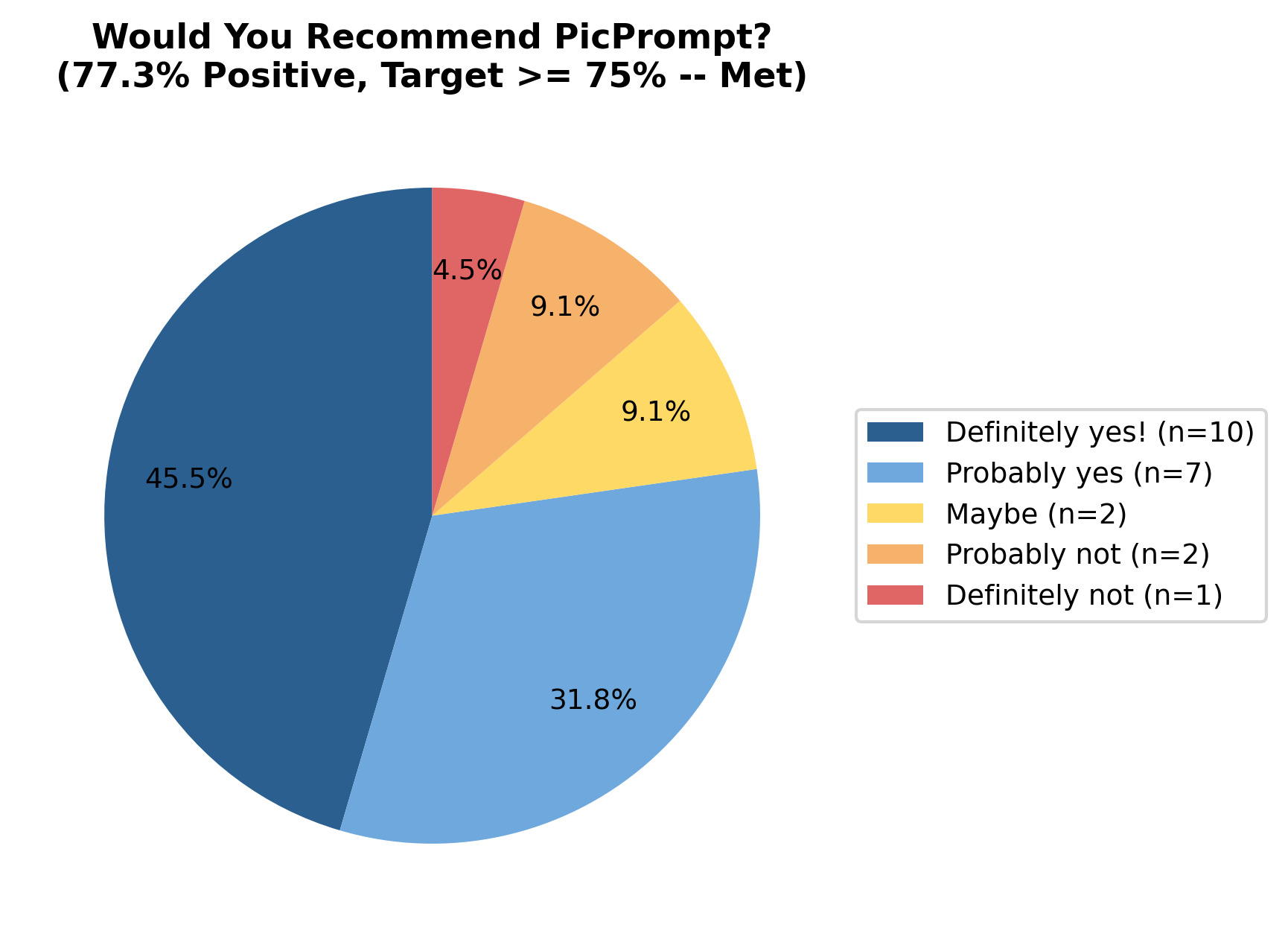
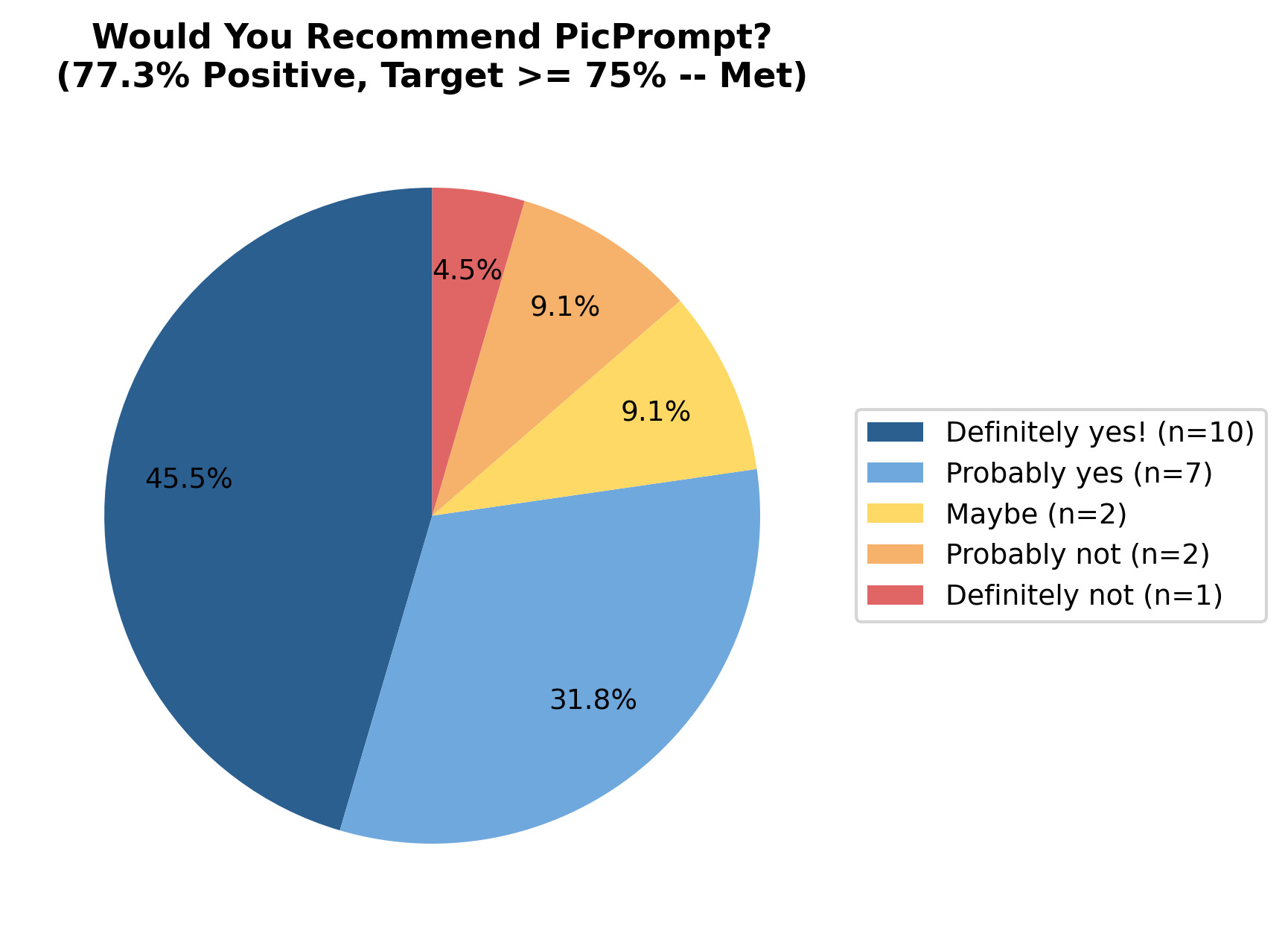
Figure 8 shows the recommendation responses. A combined 77.3% said either “Definitely yes!” (45.5%, or “Probably yes” (31.8%, meeting the goal of 75% or higher. Two students (9.1%) said “Maybe,” two (9.1%) said “Probably not,” and one (4.5%) said “Definitely not.”
6.3.8. Post-Only Targets Summary
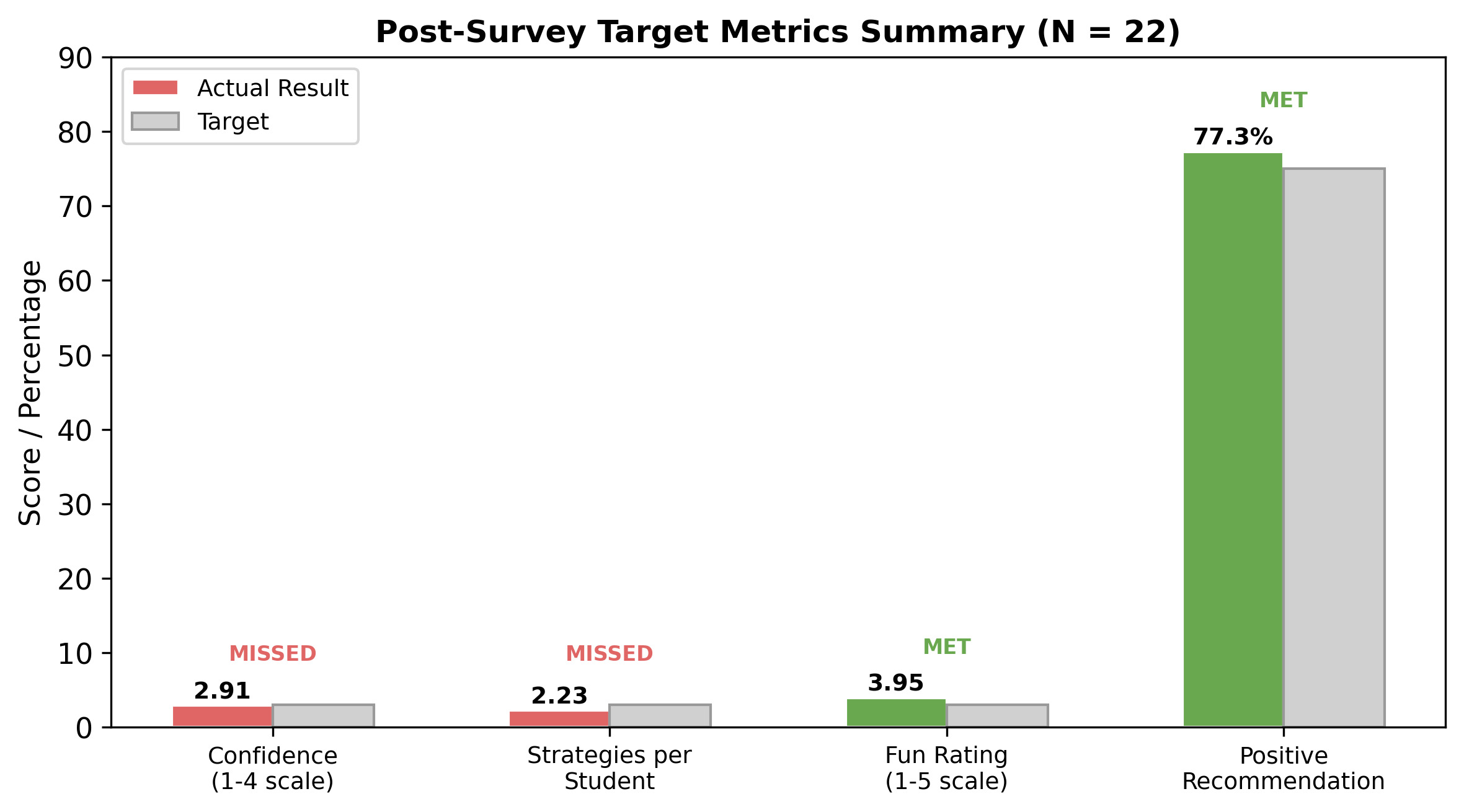
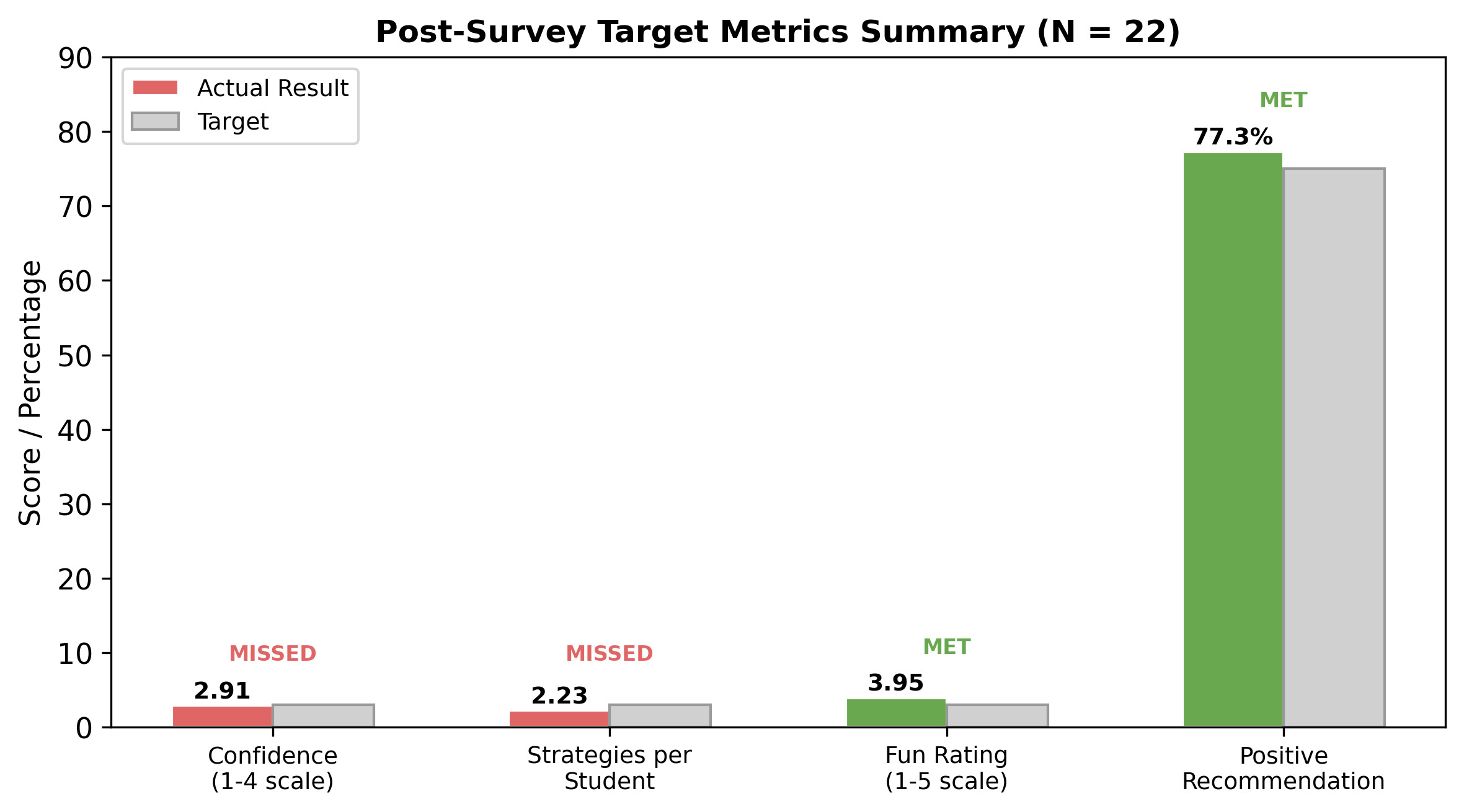
Figure 9 summarizes the four post-game measures against their goals. Two of four were met: the fun rating (3.95 vs. goal of 3.0 or higher) and the positive recommendation rate (77.3% vs. goal of 75% or higher). Two were narrowly missed: confidence (2.91 vs. goal of 3.0 or higher) and strategies per student (2.23 vs. goal of 3.0 or higher).
6.4. Qualitative Findings
6.4.1. Most Helpful Learning Feature (Post-Q12)
We asked students what part of PicPrompt helped them learn the most about writing prompts. Of 22 students, 12 gave useful responses; the remaining 10 wrote “N/A,” single-word non-answers (e.g., “Hi,” “AI”), or nothing helpful, likely because they were tired of the survey. Among the useful responses, the most common theme was writing and testing prompts Two students mentioned the visual feedback from generated images, one highlighted being specific and adding details, and one gave a generally positive response. Two responses were negative or disengaged. Representative quotes:
-
“PicPrompt helped me learn AI prompts by teaching me to be clear and add lots of details.” —5th grader
-
“All of it taught me a little that one small thing can make a big difference.” —4th grader
-
“I know how AI will respond to prompts.” —9th grader
-
“When you had to make a prompt.” —2nd grader
6.4.2. Dream Bedroom Prompt Comparison (Pre-Q7 vs. Post-Q13)
Students were given the same prompt-writing task before and after playing: describe a dream bedroom for the AI to generate. Two raters scored each response using the three-part scoring guide described above (details, descriptive words, and specificity), with total scores ranging from 3 to 12. Pre-game responses scored an average of 6.68 out of 12 post-game responses averaged only 3.55 While this appears to be a large decline it was almost entirely caused by students not answering the question. On the post-survey, 14 of 22 students (63.6%) wrote “N/A,” “same as before,” or something off-topic, all of which received the minimum score of 3. Among the students who did write a real answer, several showed steady or improved quality. For example, one student went from “Master bedrooms” to “Master bedrooms with nice colors.” The drop in scores reflects students rushing through the second survey, not a real decline in skill.
6.5. Summary of Statistical Results
Table 2 presents all paired pre–post comparisons.
7. Discussion
7.1. Addressing the Research Questions
RQ1: Students’ self-reported prompt writing knowledge increased from 2.23 to 2.73 on the 4-point scale With only 22 participants, this improvement did not reach conventional statistical significance, and the effect size (Cohen’s a small-to-medium effect) is consistent with a real change rather than confirmation of one. We treat this finding as preliminary. A follow-up power calculation, which estimates how many participants would be needed to reliably detect this size of change, indicates that around 60 students would be enough.
The clearest signal in the data was the change at the bottom of the scale. Before the game, eight students (36.4 percent) reported they had never written a prompt for AI. After the game, only one student still placed themselves there. This shift matters for a practical reason: students cannot refine a skill they have never tried. By bringing every student through at least one full cycle of writing a prompt, watching the AI respond, and seeing how peers interpreted the result, the game moved a substantial portion of the sample from “never attempted” to “has done this and can talk about it.” That movement is exactly what an introductory tool should produce, even if larger gains in self-rated proficiency will require sustained practice across multiple sessions.
RQ2: When asked what contributed most to their learning, students most frequently cited the act of writing a prompt and immediately observing the AI-generated result. Among those who provided thoughtful open-ended responses, this was the dominant theme. Students also reported acquiring concrete strategies: 59.1% indicated they learned to use descriptive words, and 50.0% reported learning to be more specific. As one 4th grader expressed, “one small thing can make a big difference”—a sentiment that captures the core lesson PicPrompt is designed to teach.
7.2. Engagement as a Foundation for Learning
Students found PicPrompt highly engaging. The average fun rating was 3.95 out of 5, and 77.3% indicated they would recommend it to peers—both figures exceeding our goals. However, the distribution was notably wide: half of all students gave a perfect score of 5, while approximately 14% gave a 1. Understanding why certain students did not engage with the game remains an important question for future work, whether the cause is age, prior AI experience, or other factors.
7.3. An Unexpected Finding: Error-Handling Strategies
An unexpected finding was that fewer students selected a helpful error-handling approach after playing (59.1%) than before (86.4%). More students chose “Giving up and starting with a completely different idea” on the post-survey. While this appears counterproductive on the surface, it may reflect a more realistic understanding of prompt writing gained through experience. In practice, effective prompt writers recognize that sometimes the best strategy is to abandon a failing prompt and begin with a new approach. The students who shifted to this response may have learned firsthand that not every prompt is worth revising.
7.4. The Challenge of Survey Fatigue
Survey fatigue presented a significant challenge. On the dream bedroom question (administered both before and after gameplay), 63.6% of students provided off-topic or empty responses on the post-survey compared to 0% on the pre-survey, making a fair comparison of prompt quality impossible. The open-ended learning question (Post-Q12) showed a similar pattern, with 45.5% of responses being unusable. In future studies, we plan to shorten the post-survey, require responses on key items, or administer open-ended questions immediately after gameplay while students remain engaged.
7.5. Connections to Prior Work
Our findings sit alongside a growing body of work on AI literacy tools for young learners. Doodlebot (Williams et al., 2024) showed that interactive drawing tasks can scaffold conversations about how generative systems represent the world, and like PicPrompt it relies on visual feedback to make abstract behavior concrete. Train Your Snake AI (Hinojosa et al., 2025) found sustained engagement when peer evaluation was built into gameplay, a result our 77.3 percent recommendation rate echoes in the prompt-writing setting. Foundational work on AI literacy frameworks (Druga et al., 2022; Touretzky et al., 2019) argues that children benefit from hands-on contact with the parts of AI systems they will actually use, not only the conceptual structure underneath. Prompt writing is one of those parts, and our results add to the case that it can be taught directly to elementary and middle school students rather than postponed to high school.
Adjacent work on text-to-image generation (Feng et al., 2023; Vimpari et al., 2023) treats prompt refinement as a craft that improves with iteration. The 4th grader who told us “one small thing can make a big difference” captured, in plain language, what Haugsbaken and Hagelia (2024) describe as iterative refinement. That students named the act of writing and testing prompts as the most helpful feature reinforces the view that this process holds educational value in its own right. Where our work pushes further is in pairing prompt writing with peer voting on guesses, which adds an explicit feedback signal beyond the generated image alone. Whether the peer-feedback loop produces lasting change in how students approach AI prompts remains an open question that longer studies will need to address (Hwang & Wu, 2025; Mahdavi Goloujeh et al., 2024).
8. Limitations
This study has several limitations that should be considered when interpreting the results.
With only 22 participants, the study did not have enough students to reliably detect small or moderate improvements in the statistical analysis. A larger sample is needed to confirm whether the observed improvement is real.
The wide age range (grades 2 through 9) is a more serious limitation than the sample size alone. Each session mixed students from the full range, so a 2nd grader and a 9th grader often played the same game in the same room, and we gave the same survey to every student regardless of age. Two issues likely shaped what we measured. First, younger students may have read Likert anchors differently than older students, even with verbal support from researchers. Second, students at very different developmental stages probably had different experiences of the same activity. Some 2nd and 3rd graders relied on older peers for spelling or strategy, and some older students appeared to soften their prompts to fit younger teammates. We cannot tell from these data whether students would have learned more in age-similar groups, but this is a question we plan to address directly in follow-up work.
The pre- and post-survey used different wording for the AI knowledge question. The pre-survey asked “how much do you know” while the post-survey asked “how much did you learn,” making direct comparison difficult. This discrepancy should be corrected in future iterations. Survey fatigue posed a significant challenge. Many students rushed through the post-survey, providing blank or off-topic responses to open-ended questions. This rendered both the dream bedroom prompt comparison and the learning feature question unreliable.
Without a control group, we cannot attribute the observed changes solely to PicPrompt. Additionally, data were collected at a single site across three sessions, which limits the generalizability of the findings. A single gameplay session may not have provided sufficient time for all students to develop and internalize prompt writing skills.
9. Conclusion and Future Work
PicPrompt is a collaborative, turn-based game that teaches K–12 students how to write effective prompts for AI image generators. In a preliminary study with 22 students in grades 2 through 9, we observed a positive trend in self-reported prompt writing knowledge, strong engagement, and consistent feedback from students that writing and testing prompts was the most valuable part of the experience. While the small sample size limits the strength of statistical conclusions, the consistent direction of results across multiple measures is encouraging.
For educators, these findings carry several implications. Game-based approaches can make AI concepts approachable for young students, including those as young as 2nd grade. The social structure of PicPrompt—where students observe each other’s guesses and vote—creates a natural mechanism for peer learning. Moreover, the gap we observed between students’ general AI awareness and their ability to write effective prompts suggests that prompt engineering warrants dedicated attention in computing education, rather than being treated as a secondary skill.
Future work will include larger studies with 60 or more participants, focusing on middle school students, to achieve sufficient statistical power. We will correct the wording discrepancy on the AI knowledge question, shorten the post-survey, and require responses on key open-ended items. Future versions of the survey will also group items by construct into clearly labeled sub-scales such as AI knowledge, prompt writing knowledge, strategy recognition, and engagement, so that students see a small number of focused sections rather than a long list of separate questions. We expect this to reduce survey fatigue and improve response quality on the post-survey. On the game itself, we plan to introduce features that increase prompt difficulty across rounds, building on the principle that prompt writing improves through repeated practice at increasing levels of challenge. Future versions may allow teachers to customize settings for different group sizes and learning objectives. We also plan to incorporate automated feedback on prompt quality using natural language processing, providing students with guidance beyond peer votes alone. Longer-term studies will help determine whether tools like PicPrompt produce lasting changes in how students understand and interact with AI. Building on recent advances in controllable image generation, future versions may also allow students to adjust specific visual parameters (such as lighting or artistic style) directly, deepening their understanding of how these models operate.
Acknowledgment
We would like to express our sincere thanks to the US Department of Education Grant Number P031C210156 for providing funding to support this research work. We extend our thanks to the Department of Computer Science at the University of Texas Permian Basin for providing resources and support.